Mobile Proxy for Responsive Testing: A Developer’s Guide

A mobile proxy for responsive testing is the practice of routing your web or app traffic through real mobile IP addresses assigned by cellular carriers to validate layout, functionality, and network behavior under authentic mobile conditions. Browser viewport emulation handles CSS breakpoints and screen dimensions, but it cannot replicate carrier-assigned IPs, geographic routing, or the actual HTTP request patterns that mobile networks produce. Tools like Burp Suite, Apify’s Multi-Resolution Screenshot actor, and mcproxy each address different layers of this problem. Understanding which layer you need to test determines which tool you reach for first.
What is a mobile proxy for responsive testing?
A mobile proxy for responsive testing routes device traffic through carrier-assigned IP addresses, giving your test environment the same network identity a real mobile user would have. This matters because servers, CDNs, and anti-fraud systems behave differently when they detect a mobile carrier IP versus a data center IP. You can resize a browser window all day and never trigger that difference.
Practitioners separate mobile responsive testing into two distinct concerns: rendering checks and network behavior validation. Rendering checks focus on layout, typography, and CSS breakpoints across screen sizes. Network behavior validation covers request headers, geolocation responses, content delivery logic, and API payloads that vary by carrier or region. Mobile proxies are required for the second category and optional for the first.

The industry term for the broader practice is mobile traffic interception and proxying, which encompasses both transparent and explicit proxy modes. The phrase “mobile proxy for responsive testing” describes the applied use case: combining real mobile IP egress with a testing proxy to catch issues that viewport emulation misses entirely.
What tools and prerequisites do you need?
Setting up a mobile proxy testing environment requires four components working together: a proxy provider, an interception tool, a test client, and a certificate management strategy.
Proxy providers supply the mobile IP addresses. You need either a 4G/5G mobile proxy service or a residential proxy pool with carrier-assigned IPs. The distinction matters because mobile IPs rotate naturally through carrier networks, mimicking real user behavior and reducing detection risk during automated testing.
Interception tools sit between your device and the internet to capture, inspect, and modify traffic. The main options differ significantly in scope:
| Tool | Primary use case | HTTPS support | Mobile device support |
|---|---|---|---|
| Burp Suite | Security and functional testing | Yes, with certificate install | Yes, explicit proxy |
| Proxyman | macOS traffic capture and replay | Yes, system extension | Yes, via Wi-Fi proxy |
| mcproxy | Browser automation with mobile context | Yes | Chromium/Firefox/WebKit |
| proxy-mcp | Transparent proxying for apps bypassing system proxy | Yes, TLS SNI MITM | Yes, iptables-based |
Test clients range from real physical devices to emulators. Physical iOS and Android devices produce the most accurate results because they use real network stacks. Android emulators via Android Studio and iOS simulators via Xcode work for layout checks but may behave differently at the network layer.
Certificate management is non-negotiable for HTTPS interception. Every interception tool generates a root CA certificate that you must install and trust on the test device. Without this step, TLS handshakes fail and you see no traffic. HTTPS interception also requires understanding TLS pinning, which many production apps implement to block exactly this kind of inspection.
Pro Tip: Use mcproxy when you need browser automation with realistic mobile context. It supports configuring isMobile, hasTouch, and randomized user-agent strings alongside proxy routing, which means your automated tests present as genuine mobile sessions rather than desktop browsers with a resized viewport.
How to configure devices and browsers for mobile proxy traffic
Routing traffic through a mobile testing proxy requires different steps depending on whether you are working with a real device, an emulator, or a browser automation framework.
For real Android devices:
- Connect the device to the same Wi-Fi network as your proxy host.
- Long-press the Wi-Fi network name and select “Modify network.”
- Set proxy to “Manual,” enter your proxy host IP and port (typically 8080 for Burp Suite).
- Open a browser and navigate to the proxy’s certificate download URL (e.g., http://burpsuite for Burp Suite).
- Download and install the CA certificate via Settings > Security > Install from storage.
- Trust the certificate under Settings > Security > Trusted credentials.
- Verify interception by loading any HTTPS site and confirming requests appear in the proxy tool.
For real iOS devices:
- Go to Settings > Wi-Fi, tap the info icon next to your network.
- Scroll to HTTP Proxy and select “Manual.”
- Enter the proxy server IP and port.
- In Safari, navigate to the proxy’s certificate URL and download the profile.
- Install via Settings > General > VPN & Device Management.
- Enable full trust under Settings > General > About > Certificate Trust Settings.
For mcproxy browser sessions, the configuration lives in code. You define a session object specifying the proxy URL, device type, viewport dimensions, and mobile flags. mcproxy supports Chromium, Firefox, and WebKit engines, and it randomizes user-agent strings to avoid fingerprinting patterns that would identify your test traffic as automated.
For emulators, Android Studio’s AVD Manager lets you set a proxy under Extended Controls > Settings > Proxy. iOS simulators route through the macOS system proxy, so configuring the system proxy in Network Preferences is sufficient.
Pro Tip: If you are testing on a physical device and HTTPS traffic is not appearing in your proxy tool, check whether the app uses certificate pinning. Apps with pinning reject your injected CA certificate. You will need a transparent proxy approach using iptables redirection to capture that traffic at the network layer instead.
How to capture and analyze real mobile network traffic
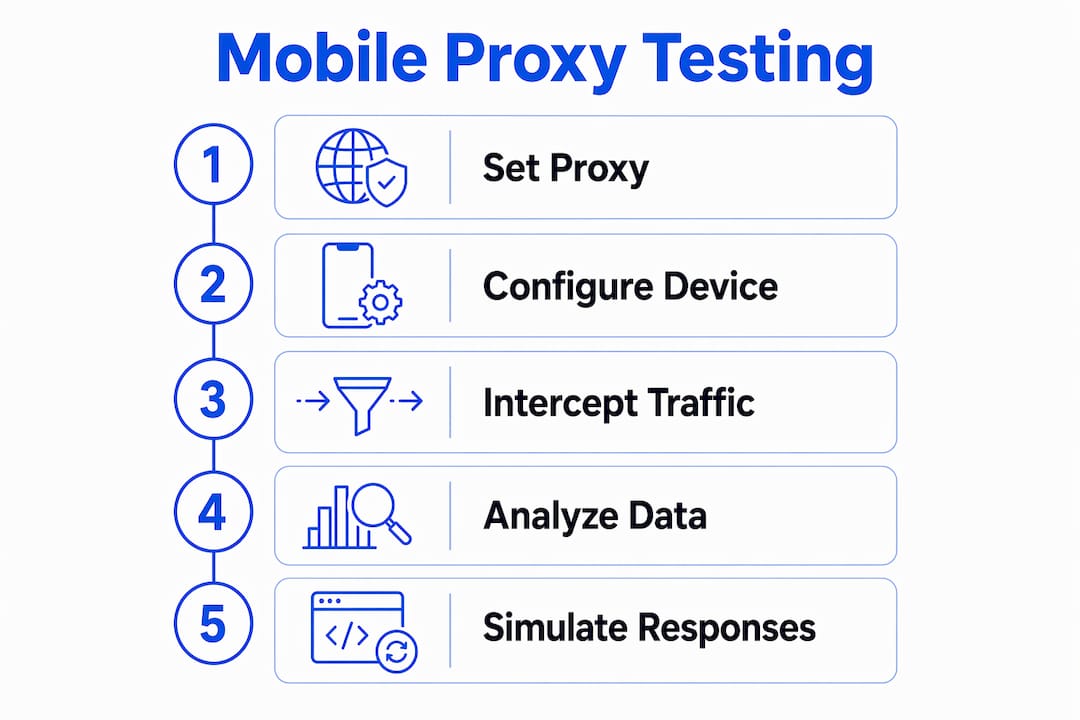
Traffic capture during responsive testing produces the evidence you need to diagnose network-layer issues that visual checks never surface. The workflow has three stages: intercept, inspect, and replay.
Interception with Burp Suite or Proxyman gives you a live view of every HTTP and HTTPS request the device makes. You can see request headers including User-Agent, Accept-Language, and X-Forwarded-For values, which reveal whether your server is correctly identifying and serving mobile content. You can also modify requests in flight to test how your API handles edge cases.
Correlation between UI actions and network events is where testing workflows become genuinely powerful. The mobile-automator-mcp framework orchestrates Maestro UI automation alongside Proxyman HTTP capture to produce replayable test scripts with network mocks. This means you record a user flow once, capture the exact network calls it generates, and replay that flow deterministically without relying on live network conditions. Flaky tests caused by network variability drop significantly with this approach.
Replay and simulation with tools like WireMock let you substitute real API responses with controlled mocks. This is particularly useful for testing how your responsive layout handles slow 3G responses, empty states, or error payloads. You define the mock responses once and run the same UI test against multiple network condition profiles.
Some mobile apps use custom HTTP stacks that bypass system proxies entirely. For these cases, transparent proxy listeners using iptables REDIRECT rules combined with TLS SNI inspection capture traffic that explicit proxies miss. This is an advanced configuration but necessary for thorough mobile app proxy testing on production-grade applications.
Pro Tip: Pair your network capture sessions with geographic IP variation. Running the same test through mobile proxies in different regions reveals CDN routing differences, localized API responses, and geo-restricted content behavior that a single-location test will never expose.
Viewport emulation vs. mobile proxy testing: which do you need?
These two approaches solve different problems, and conflating them leads to gaps in test coverage.
Viewport emulation resizes the browser window and adjusts the device pixel ratio to match a target screen size. Tools like Apify’s Multi-Resolution Screenshot actor capture layouts across device presets including mobile, tablet, and desktop in a single run. This is fast, scriptable, and sufficient for catching CSS breakpoint failures, overflow issues, and font scaling problems.
Mobile proxy testing adds network identity to the equation. When your test traffic exits through a real carrier IP, the server sees a genuine mobile user. This affects CDN edge selection, A/B test bucket assignment, geo-targeted content delivery, and any server-side logic that branches on IP type or location.
| Approach | What it tests | What it misses | Best for |
|---|---|---|---|
| Viewport emulation | Layout, CSS breakpoints, visual rendering | Network behavior, IP-based logic, carrier routing | Visual regression, layout QA |
| Mobile proxy testing | Network requests, geo-routing, API responses | Pixel-level rendering accuracy | Functional QA, security testing |
| Combined approach | Both rendering and network fidelity | Nothing significant | Production-grade test coverage |
The combined approach is the standard for teams shipping to real mobile audiences. You run viewport emulation for visual regression on every commit, then run mobile proxy sessions for functional and network validation on release candidates. This keeps CI pipelines fast while preserving depth where it matters.
Common challenges and how to fix them
Mobile proxy testing introduces configuration complexity that pure emulation avoids. These are the issues you will encounter most often and how to address them.
- Certificate trust failures: The device does not trust your proxy’s CA certificate. Reinstall the certificate and verify it appears under trusted credentials. On Android 7 and above, user-installed certificates are not trusted by default for app traffic. You may need to modify the app’s network security config or use a rooted device for full interception.
- TLS pinning blocks: The app rejects your CA certificate because it pins to a specific certificate or public key. Transparent MITM proxying at the network layer using TLS SNI inspection is the reliable workaround here.
- IP rotation causing session breaks: Mobile proxies rotate IPs naturally through carrier networks. If your test relies on session continuity, configure sticky sessions on your proxy provider to hold the same IP for the duration of the test run.
- Proxy detection by the target server: Some servers flag proxy traffic based on IP reputation or header anomalies. Using 4G mobile proxies with genuine carrier assignments reduces this risk because the IPs carry legitimate mobile network history.
- Emulator network stack differences: Android emulators and iOS simulators do not perfectly replicate real device network behavior. For security testing and API validation, always confirm findings on physical hardware before treating them as definitive.
Key takeaways
A mobile proxy for responsive testing requires both a real carrier-assigned IP and an interception tool to validate network behavior that viewport emulation cannot reproduce.
| Point | Details |
|---|---|
| Two distinct test layers | Separate visual rendering checks from network behavior validation and apply the right tool to each. |
| Certificate management is critical | Install and trust the proxy CA certificate on every test device before attempting HTTPS interception. |
| Transparent proxying for apps | Use iptables-based transparent proxies to capture traffic from apps that bypass system proxy settings. |
| Combine emulation and proxies | Run viewport emulation for visual regression on every commit and mobile proxy sessions for functional validation on releases. |
| IP rotation and sticky sessions | Configure sticky sessions when tests require session continuity across multiple requests. |
Why most teams underinvest in network-layer testing
I have reviewed testing workflows for development teams across a range of project sizes, and the pattern is consistent: teams invest heavily in visual regression and almost nothing in network-layer validation. The reasoning is understandable. Viewport emulation is fast, cheap, and easy to integrate into CI. Mobile proxy configuration takes time, certificates expire, and TLS pinning creates friction that feels disproportionate to the benefit.
That reasoning breaks down the moment you ship geo-targeted content, carrier-specific API logic, or any feature that branches on IP type. I have seen teams spend days debugging a production issue that a single mobile proxy test session would have caught in minutes. The server was serving a different content variant to carrier IPs, and no amount of viewport resizing in Chrome DevTools would have revealed it.
The tools have improved significantly. Frameworks like mobile-automator-mcp make it practical to record a user flow once and replay it with consistent network mocks, which removes most of the flakiness that made network-layer testing feel unreliable. The investment in setup pays back quickly on any project with real mobile traffic.
My recommendation: start with Burp Suite on a physical Android device for your first mobile proxy session. The learning curve is real but manageable. Once you have intercepted your first HTTPS request from a real device, the value of the approach becomes immediately obvious. From there, layer in geographic IP variation using a provider like Hydraproxy to test how your CDN and API behave across regions.
— Eduard
Test smarter with Hydraproxy mobile proxies
Hydraproxy provides 4G and 5G mobile proxy networks with carrier-assigned IPs across multiple regions, built for the kind of network-layer testing described in this guide. The infrastructure supports both rotating and sticky sessions, so you can match the proxy behavior to your test requirements without reconfiguring your setup between runs. Integration with tools like Burp Suite, mcproxy, and Proxyman requires only standard HTTP(S) proxy credentials. For teams that need geographic coverage, Hydraproxy’s worldwide mobile proxy network gives you regional IP egress to validate geo-targeted content delivery and carrier-specific API responses. Learn more about the underlying infrastructure in the mobile proxy servers guide.
FAQ
What is a mobile proxy for responsive testing?
A mobile proxy for responsive testing routes your test traffic through real carrier-assigned mobile IP addresses so you can validate network behavior, geo-routing, and API responses under authentic mobile conditions. It goes beyond viewport emulation by adding real network identity to your test sessions.
Do I need a mobile proxy if I already use viewport emulation?
Viewport emulation handles visual layout and CSS breakpoints but does not replicate carrier IP behavior, geographic routing, or server-side logic that branches on IP type. You need a mobile testing proxy when your application serves different content or API responses based on network identity.
How do I intercept HTTPS traffic from a mobile device?
Configure your device to route traffic through a proxy like Burp Suite, then install and trust the proxy’s CA certificate on the device. Apps with TLS pinning require a transparent proxy approach using iptables redirection and TLS SNI inspection to capture traffic that bypasses the system proxy.
Why does my mobile app ignore the system proxy setting?
Many mobile apps use custom HTTP stacks that bypass system proxy configuration entirely. Transparent proxying with iptables REDIRECT rules intercepts this traffic at the network layer, capturing requests that explicit proxy settings miss.
What is the difference between rotating and sticky mobile proxy sessions?
Rotating sessions assign a new IP address on each request or connection, mimicking natural carrier behavior and reducing detection risk. Sticky sessions hold the same IP for a defined duration, which is necessary when your test requires session continuity across multiple authenticated requests.