The address and port of a proxy server are the specific IP address and port number that the proxy server uses to communicate with clients and forward their requests to other servers. These details are essential for configuring devices or applications to route their internet traffic through the proxy server.
If you’ve ever tried to set up a proxy and hit a screen asking for a host and a port, you’re not alone in wondering what those actually mean.
The short version: they’re just the address and the entry point of a proxy server.
The longer version is below — explained without networking jargon.
The Simple Idea Behind Proxy Settings
When you use a proxy, your internet traffic doesn’t go directly from your device to a website. Instead, it takes a detour through another server.
To make that detour work, your device needs two things:
- Where the proxy server is
- How to connect to the right service on that server
That’s where host and port come in.
What is a proxy IP address or proxy host?
A proxy IP address is the IP address of a proxy server, which acts as an intermediary between a client (such as your computer or smartphone) and the internet. When you use a proxy server, your internet traffic is routed through this server before reaching its final destination. This can provide several benefits, including privacy, security, and the ability to bypass geographic restrictions. This is the numerical label assigned to the proxy server, which can be in IPv4 (e.g., 192.168.1.1) or IPv6 (e.g., 2001:0db8:85a3:0000:0000:8a2e:0370:7334) format.
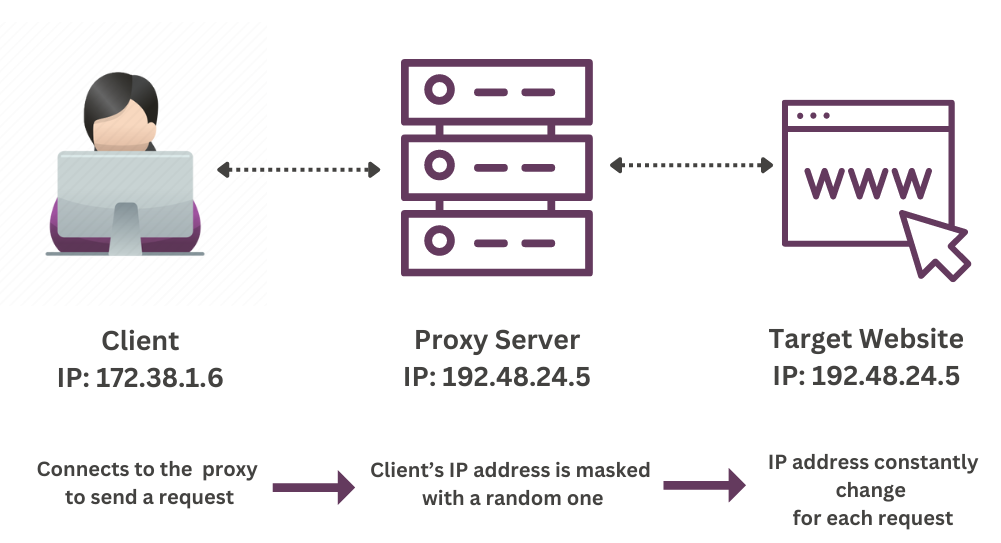
How Proxy Servers Work
- Client Request: Your device sends a request to access a website or service.
- Proxy Server: The request goes to the proxy server, which has its own IP address.
- Forwarding Request: The proxy server forwards your request to the destination server.
- Response: The destination server responds to the proxy server.
- Proxy Server Sends Response: The proxy server sends the response back to your device.
Proxy Host vs. IP Address for Rotating Proxies
If you’re using rotating proxies, the proxy host works a little differently than people often expect.
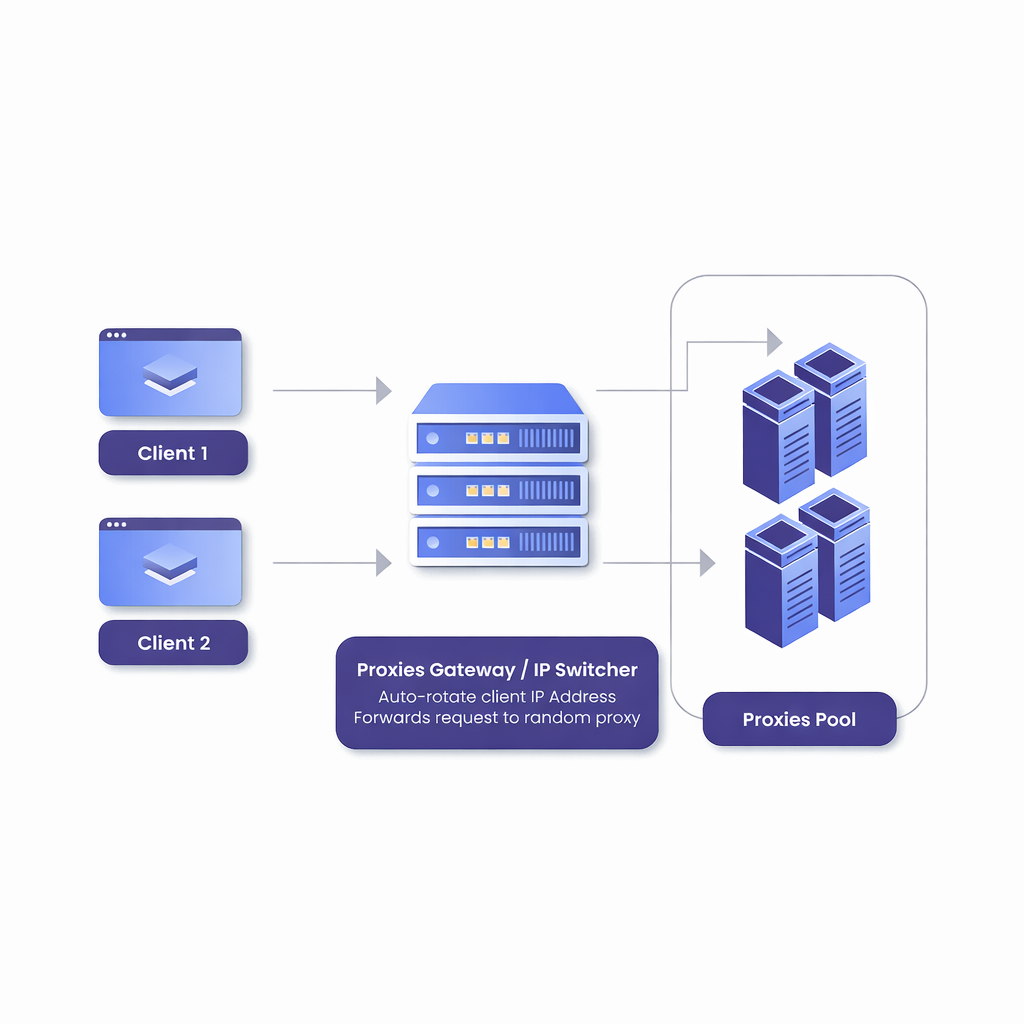
With rotating proxies, the proxy host is not the public IP address you appear to websites as. Instead, it’s a gateway server that manages a pool of IPs behind the scenes.
What This Means in Practice
When your provider gives you a rotating proxy setup like this:
isp3.hydraproxy.com : 8000
- isp3.hydraproxy.com is the proxy host
- It does not represent a single public IP
- The actual IP seen by websites changes automatically on each request or session
Your device connects to the same host and port every time, while the proxy service handles IP rotation internally.
Why Rotating Proxies Use a Single Host
Rotating proxy networks are designed this way for simplicity and scalability.
Instead of forcing users to constantly update IP addresses, the provider runs a central proxy server that:
- Accepts your connection
- Assigns an available IP from its pool
- Rotates or refreshes that IP based on rules (per request, per time window, or per session)
From your side, nothing changes — the host and port stay the same.
Common Mistake: Entering a Public IP as the Host
A common setup error is trying to use one of the rotating IPs as the proxy host.
This won’t work.
Rotating proxy IPs are outputs, not connection endpoints. You always connect to the proxy gateway, not the individual exit IP.
What is a proxy port?
A proxy port is a connection gateway to the proxy network. This is the specific port on the proxy server that is used for communication, typically a number between 1 and 65535. Common proxy server ports include 8080, 3128, and 1080.
Lets take the case of our rotating mobile proxies. They have port pricing with 1, 3, 7 and 30 days plans.
The number of ports you choose gives you the number of access points you can use on our network at any given time.
For example: if you get 1 port, you will have one access point to our network to use one rotating IP address. IP that rotates at minimum 30 min. But with 3 ports, you get 3 access points at the same time. This means that you can use 3 rotating proxies at once. In other words, the number of ports is the number of proxy connections you want to get.
Unlike the rotating mobile proxies, residential proxies have bandwidth pricing and use a single port number: 9989
Bandwidth is the number of GB (Gigabytes) you buy to use during your connections via the proxy network.
As an example, if you buy 1 GB and the accessed site has 2 MB pages, in theory, you can use up to 500 different IPs.
Each time you access that particular page, you use 2 MB, hence 1 GB (which is 1000 GB) will be used to access the same page 500 times, each time via a different IP.
Putting It Together: Proxy Host and Port
When people ask:
What is proxy host and port?
They’re really asking how these two pieces work together.
Here’s a simple example:
proxy.example.com : 8080
proxy.example.com→ proxy host8080→ proxy port
Together, they form the full connection point your device uses to route traffic through the proxy.
If either one is wrong, the connection won’t work.
Why Both Are Required
Think of it like calling a company:
- The host is the phone number
- The port is the extension
Calling the right number but the wrong extension won’t get you to the right place — and neither will using a port without a valid host.
Where You’ll See Proxy Host and Port Settings
You’ll usually enter these details when configuring a proxy in:
- Browser network settings
- Operating system proxy settings
- Automation tools or scrapers
- Apps that support manual proxy configuration
Different interfaces may label them slightly differently (for example, “address” instead of “host”), but the meaning stays the same.
A Quick Real-World Example
If your proxy provider gives you this information:
Host: 198.51.100.23
Port: 3128
You enter both values into your settings, save, and your traffic starts flowing through that proxy server.
No hidden complexity — just two required fields.
Final Takeaway
- Proxy host tells your device where the proxy server is
- Proxy port tells it how to connect to the right service
- Both are required for a working proxy connection
Once you understand that, proxy setup stops feeling technical and starts feeling routine.