Why Mobile Proxies Matter for App Testing in 2026

If you’re testing your app on a stable office Wi-Fi connection and calling it done, you’re testing a version of your app that most users will never experience. 53% of mobile users abandon an app that takes longer than three seconds to load, yet most QA environments never simulate the patchy, carrier-routed networks real users deal with daily. Understanding why mobile proxies matter for app testing goes beyond routing traffic through a different IP. It’s about replicating the actual conditions your users face, in their geography, on their carrier, with their network constraints.
Table of Contents
- Key Takeaways
- Why mobile proxies matter for app testing
- Geo-targeted testing and personalization verification
- Performance testing under real network conditions
- Security and trust implications in QA environments
- Choosing the right mobile proxy solution
- My take on mobile proxy integration in testing workflows
- How Hydraproxy supports your app testing needs
- FAQ
Key Takeaways
| Point | Details |
|---|---|
| Mobile proxies use real carrier IPs | Traffic routes through genuine carrier-assigned IPs, making it indistinguishable from real user traffic. |
| Geo-targeted testing requires carrier authenticity | VPNs and datacenter proxies fail to replicate carrier-specific content, pricing, and ad delivery. |
| Network condition realism matters | Mobile proxies expose API timeout failures and session breaks that stable Wi-Fi environments hide. |
| Session type affects test outcomes | Static proxies suit login and multi-step flows; rotating proxies work better for broad behavioral coverage. |
| Proxy quality directly impacts results | Poor IP reputation or fingerprint mismatches undermine the trust advantages mobile proxies provide. |
Why mobile proxies matter for app testing
A mobile proxy routes your traffic through an IP address assigned by a real mobile carrier, such as AT&T, Verizon, or T-Mobile. The device on the other end is a physical mobile device connected to a cellular network, not a server in a data center.
The technical detail that makes this significant is carrier-grade NAT, or CGNAT. Under CGNAT architecture, a single public IP address is shared among thousands of legitimate mobile users simultaneously. When your test traffic comes from one of these IPs, anti-bot systems and platform algorithms see it as ordinary user behavior, because statistically, it is. Blocking that IP would mean blocking thousands of real users, which no platform is willing to do.
Contrast this with datacenter proxies, which originate from server farms with predictable ASN patterns, or residential proxies, which use home broadband IPs. Both can be detected and blocked with moderate effort. Mobile proxies sit in a different category because the trust asymmetry they carry is structural, not cosmetic.
Here is what that means practically for your testing setup:
- Carrier-assigned IPs pass IP reputation checks at rates that datacenter proxies cannot match
- CGNAT sharing creates natural traffic dilution that protects against detection
- Real device signals mean your traffic carries authentic mobile network metadata
- Carrier coverage varies by provider, so choose a proxy network that covers the carriers your users actually use
Pro Tip: Before selecting a mobile proxy provider, verify that their IPs originate from actual SIM-based devices, not re-labeled residential IPs. Ask for carrier attribution data or run a quick ASN check against known carrier ranges.
Geo-targeted testing and personalization verification
This is where the benefits of mobile proxies for app testing become most concrete. Many apps deliver different experiences based on the user’s location, carrier, or both. Pricing tiers, promotional content, regulatory disclosures, and ad creatives can all vary by region and carrier. Testing these variations accurately requires traffic that platforms recognize as originating from the correct location and network.

VPNs change your visible IP address, but platforms have become sophisticated at detecting VPN traffic. Datacenter proxies are flagged even faster. Neither replicates the carrier-specific signals that mobile proxies carry. Mobile proxies simulate real carrier traffic, which is the only reliable way to verify geo-targeted pricing, carrier-specific ad delivery, and regional content restrictions.
Here is a structured approach to geo-targeted testing using mobile proxies:
- Define your target markets. Identify the countries, cities, and carriers where your user base is concentrated. Prioritize these for initial testing coverage.
- Select proxies with matching carrier attribution. If your users are primarily on T-Mobile in the US and EE in the UK, your test traffic should originate from those carriers specifically.
- Verify content and pricing variations. Load your app through each proxy configuration and document what the user sees. Compare against expected regional outputs.
- Test A/B experiment exposure. Major platforms exclude datacenter and VPN traffic from experiment buckets. Mobile proxies allow you to verify that your users in specific regions are receiving the correct variant.
- Check regulatory compliance elements. Cookie consent banners, GDPR notices, and age verification flows are often geo-gated. Confirm these render correctly from each target region.
- Validate ad creatives. Use mobile proxies to confirm that carrier-specific ads are displaying correctly and that no region is receiving mismatched or missing creatives.
The ability to start with broad location targeting and narrow down only when test outcomes show meaningful geographic variation is a practical cost-control strategy. Not every test requires city-level precision. Country-level targeting is often sufficient for initial validation passes.
Performance testing under real network conditions
Your app might perform flawlessly on a 200 Mbps office connection and fail completely when a user is on a crowded subway with intermittent 3G. Testing under degraded network profiles such as Fast 3G at 1.5 Mbps with 40ms latency, Slow 3G, and 2G is not optional if you want your app to survive in production. Mobile proxies introduce the kind of latency variability and bandwidth constraints that actually reflect these conditions.
The specific failure modes that stable environments hide are worth knowing:
- API timeout failures that only surface when response times exceed 3 to 5 seconds under real mobile latency
- Session persistence breaks when a user switches between Wi-Fi and cellular mid-session
- Image and asset loading failures when bandwidth drops below what your app assumes is available
- Retry logic gaps where your app fails silently instead of queuing requests during connectivity drops
- Offline handling deficiencies that only appear when the network becomes genuinely unreliable
Mobile proxies introduce latency variability that mirrors what users experience on cellular networks. This is not a flaw. It is the point. An app that handles 200ms to 800ms response time swings gracefully is an app that works in the real world.
Pro Tip: Use static mobile proxies when testing multi-step workflows like checkout flows or login sequences. Rotating proxies can break session continuity mid-flow, which produces false failure signals that waste debugging time.
Security and trust implications in QA environments
The benefits of mobile proxies in QA environments extend to security testing as well. Because mobile proxies achieve 95%+ pass rates on strict platforms, they allow security researchers and QA teams to test how their app behaves under realistic traffic conditions without triggering defensive blocks that would obscure the results.
That said, mobile proxies are not a security shortcut. Using them incorrectly introduces risks that undermine the trust advantages they provide.
- Never route sensitive credentials or personal user data through a proxy unencrypted. Always use HTTPS and verify the proxy does not perform SSL inspection.
- Check IP reputation before scaling. A proxy pool with blacklisted IPs will produce inconsistent results and may trigger blocks that corrupt your test data.
- Match your client-side fingerprint to mobile traffic. If your browser or test client reports a desktop user agent while your IP is a mobile carrier address, platforms will flag the mismatch. Use mobile user agents and screen resolutions that match the proxy’s network profile.
- Watch for WebRTC leaks. WebRTC can expose your real IP even when a proxy is active. Disable WebRTC in your test environment or use a browser that supports proxy-aware WebRTC handling.
- Verify timezone consistency. A carrier IP from Tokyo paired with a browser reporting UTC-5 is a detectable inconsistency that reduces your test fidelity.
Pro Tip: For security research workflows, treat mobile proxy integration as a routing strategy, not a shortcut. Verify proxy legitimacy, audit your fingerprint stack, and document your test configurations so results are reproducible.
Choosing the right mobile proxy solution
Not every testing task requires the same proxy configuration. The decision between static and rotating mobile proxies, and between different provider tiers, should follow from your specific testing goals.
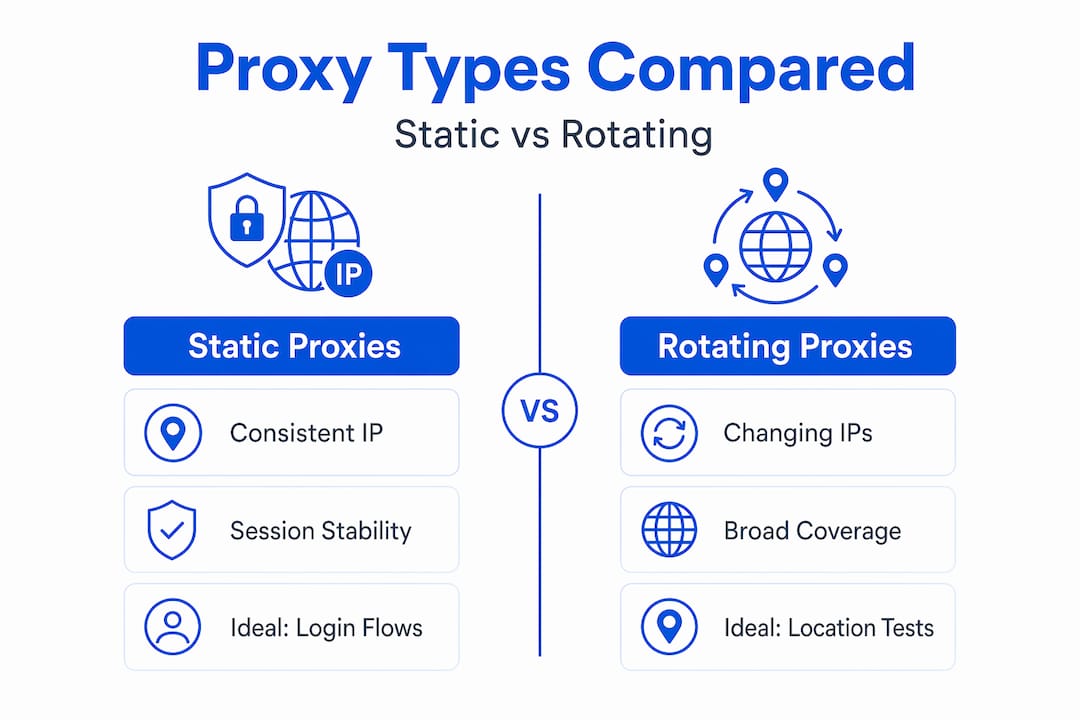
Static mobile proxies maintain a consistent IP across your session, which is necessary for testing login flows, account-based features, and any workflow where the platform tracks session state. Rotating proxies cycle IPs at set intervals or per request, which suits broader behavioral observation, ad verification sweeps, and geographic coverage testing where session continuity is not required.
The table below compares proxy types across the dimensions that matter most for app testing decisions:
| Feature | Mobile proxies | Residential proxies | Datacenter proxies |
|---|---|---|---|
| IP trust level | Very high (carrier CGNAT) | High (home broadband) | Low (server ASN) |
| Detection resistance | Strongest | Moderate | Weakest |
| Latency | Variable (real mobile) | Moderate | Low and stable |
| Session continuity | Strong (static option) | Moderate | Strong |
| Geo and carrier targeting | Precise | Country/city level | Country level only |
| Cost | Highest | Moderate | Lowest |
| Best for | Carrier-specific, geo, security testing | Broad geo testing, scraping | High-volume, low-sensitivity tasks |
When evaluating providers, prioritize IP pool size, carrier coverage in your target markets, and session reliability metrics. A provider with 10,000 IPs across three carriers is less useful than one with 50,000 IPs covering the carriers your users actually use. You can review proxy performance evaluation methods before committing to a provider at scale.
Pro Tip: Cost effectiveness improves significantly when you reserve mobile proxies for workflows that genuinely require carrier-based authenticity. Use residential or ISP proxies for tasks where carrier-level trust is not the deciding factor.
My take on mobile proxy integration in testing workflows
I’ve watched a lot of QA teams adopt mobile proxies and immediately make the same mistake. They treat them as a premium default for every test, regardless of whether the test actually requires carrier-level authenticity. That approach burns through budget fast and produces no meaningful improvement in test quality for the tasks that don’t need it.
What I’ve found actually works is treating mobile proxies as a specialized instrument. You reach for them when the test outcome depends on carrier signals, geo-specific content delivery, or platform trust levels. For everything else, a well-configured residential proxy does the job at lower cost.
The uncomfortable truth about proxy over-reliance is this: if your client-side fingerprint doesn’t match your proxy’s network profile, you’re not getting the trust benefits you paid for. I’ve seen teams run mobile proxies with desktop user agents and wonder why their pass rates are inconsistent. The proxy is only one layer. The full fingerprint stack has to be coherent.
The teams that get the most out of mobile proxies combine them with disciplined test plans, clear success metrics, and a willingness to audit their results rather than assume the proxy is doing all the work. Start with a specific question your test needs to answer. Choose the proxy type that serves that question. Measure the outcome. Adjust.
That methodology produces reliable, reproducible results. Defaulting to mobile proxies for everything does not.
— Eduard
How Hydraproxy supports your app testing needs
Hydraproxy provides genuine carrier-assigned mobile proxy pools across 4G and 5G networks, with coverage spanning major carriers in key markets. The platform supports both static and rotating session modes, so you can match your proxy configuration to your specific testing workflow without compromising session continuity or geographic accuracy.
For QA teams running geo-targeted validation, ad verification, or performance testing under real mobile conditions, Hydraproxy’s infrastructure is built to reduce test interruptions and maintain high platform pass rates. The mobile proxy network includes session control options, multiple authentication methods, and no monthly commitments, so you can scale testing coverage without locking into fixed costs.
If you’re evaluating proxy options for your QA environment, Hydraproxy also offers residential proxy solutions for workflows where carrier-level authenticity is not required, giving your team the flexibility to match proxy type to task across your full testing pipeline.
FAQ
What makes mobile proxies different from VPNs for app testing?
Mobile proxies route traffic through genuine carrier-assigned IPs under CGNAT, making them indistinguishable from real user traffic. VPNs use server IPs that platforms routinely detect and exclude from experiments and geo-targeted content delivery.
When should I use static vs rotating mobile proxies?
Use static mobile proxies for multi-step workflows like login sequences and checkout flows where session continuity is required. Rotating proxies suit broader behavioral testing and ad verification sweeps where a consistent IP is not needed.
Can mobile proxies help with A/B test verification?
Yes. Platforms like Meta and Google exclude datacenter and VPN traffic from experiment buckets. Mobile proxies carry carrier-level trust signals that allow your test traffic to receive the same A/B treatment as real users in the target region.
How do mobile proxies improve security testing accuracy?
Mobile proxies achieve 95%+ pass rates on strict platforms, allowing security researchers to test app behavior under realistic conditions without triggering defensive blocks that would distort results.
What are the biggest mistakes teams make with mobile proxies?
The most common mistakes are mismatching client-side fingerprints with mobile traffic profiles, routing sensitive data without HTTPS, and using mobile proxies for every test regardless of whether carrier authenticity is actually required.