How Proxies Simulate Real Users for Data Collection

Proxy-based user simulation is defined as the practice of replicating the full network identity of a real browser user, including IP address, TLS fingerprint, browser signals, and behavioral patterns, to make automated requests indistinguishable from genuine human traffic. This is the technical foundation behind effective proxies for web scraping, market research, and ad verification. Tools like Playwright, curl_cffi, and anti-detect browsers such as FlashId operate on this principle: the proxy supplies the network identity layer, while additional components handle fingerprint and behavior alignment. Understanding how proxies simulate real users at each layer is what separates successful data collection from blocked requests.
How do proxies simulate real users at the technical level?
Proxies simulate real users by forwarding client requests through their own IP address, so the target server sees a legitimate-looking origin rather than your actual machine. That is the network layer. But modern anti-bot systems evaluate far more than the IP address alone.

Advanced detection platforms like Akamai Bot Manager apply layered scoring across network, TLS, and behavioral signals to classify traffic. Each layer acts as an independent checkpoint. Passing one while failing another is enough to trigger a block.
Here are the core technical layers that proxies and supporting tools must replicate:
- IP address and geolocation. The proxy supplies an IP that maps to a real residential or mobile network. The geographic location must be consistent with the browser’s reported locale.
- TLS ClientHello fingerprint (JA3/JA4). The TLS handshake fingerprint is evaluated before any HTML loads. Non-browser HTTP clients like Python’s "requests` library produce a distinct TLS signature that flags the connection immediately.
- Browser fingerprint elements. Canvas rendering, installed fonts, WebGL output, screen resolution, and plugin lists are all collected via JavaScript. These must match a plausible real-device profile.
- HTTP header ordering and values. Header sequence and field values are fingerprinted. Curl and Python clients produce header orders that differ from Chrome or Firefox, and detection systems know the difference.
- Session and cookie behavior. Real users accumulate cookies across a session. Requests arriving without cookies, or with cookies from a different IP, signal automation.
- Behavioral patterns. Mouse movement entropy, scroll behavior, click timing, and request cadence are scored. Fixed-interval requests with no variance are a clear automation signal.
Pro Tip: Use curl_cffi instead of the standard Python requests library. It impersonates Chrome’s TLS fingerprint at the protocol level, eliminating one of the most common detection triggers before you even configure your proxy.
Which proxy type best mimics real user traffic?
Not all proxies carry the same trust weight with target servers. The network origin of an IP determines how much it resembles a genuine user, and that resemblance directly affects block rates.
| Proxy type | Network origin | Trust level | Block risk | Best use case |
|---|---|---|---|---|
| Residential | Real ISP-assigned home IPs | High | Low | Market research, price monitoring |
| Mobile (4G/5G) | Real carrier networks | Very high | Very low | Social platforms, ad verification |
| ISP (static residential) | ISP-assigned but datacenter-hosted | Medium-high | Low-medium | Long sessions, account management |
| Datacenter | Cloud hosting providers | Low | High | Speed-critical, low-security targets |
Mobile proxies operate on real carrier networks and share IPs among thousands of legitimate users, which is why they carry the highest trust scores. FlashId’s research describes mobile proxies as the gold standard for user simulation due to their real mobile network connections. That shared-IP characteristic means blocking a mobile IP risks disrupting thousands of real users, so platforms are far more cautious about flagging them.
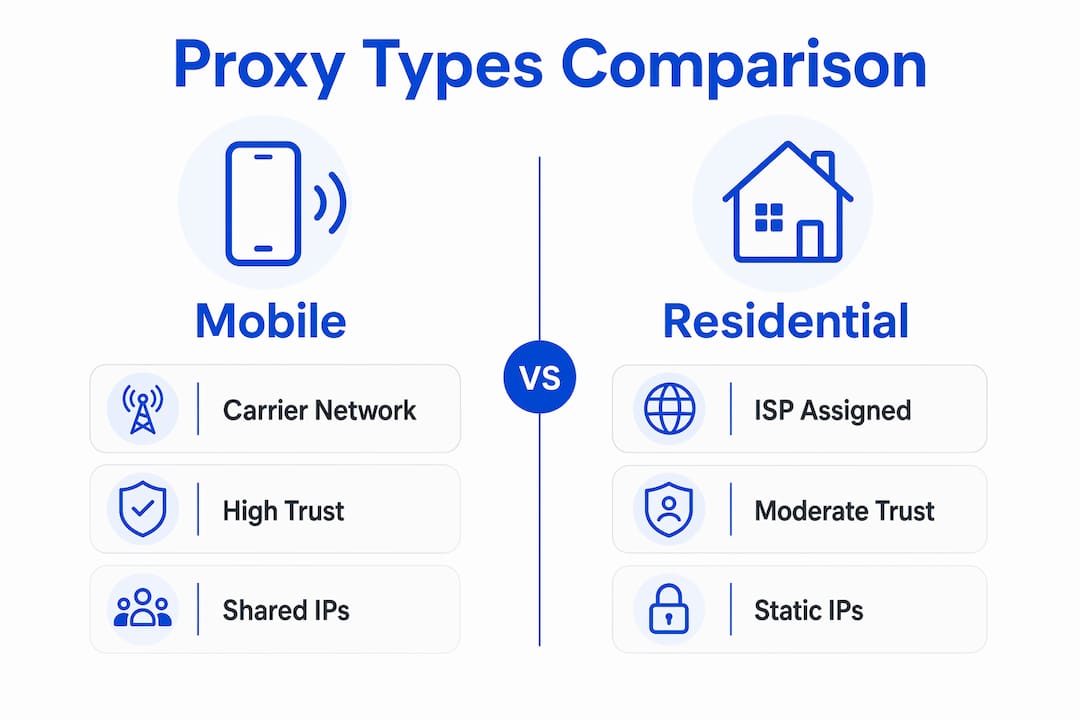
Residential proxies sit one tier below mobile in trust but remain the most practical choice for most data collection tasks. They originate from real ISP-assigned home connections, making them far more convincing than datacenter IPs. Datacenter proxies are fast and inexpensive, but their IP ranges are well-known to anti-bot vendors and carry the highest block risk on protected targets.
The rotating versus static decision matters as much as proxy type. Rotating proxies work well for large-scale scraping where each request can represent a fresh user. Sticky or static proxies are necessary for tasks requiring session continuity, such as account-based data collection or multi-step checkout monitoring.
Why IP rotation alone fails to bypass detection
IP rotation is the most common proxy technique, and it is also the most commonly misunderstood. Changing the IP address on every request does not make traffic look human. It makes traffic look like a bot that changes its IP on every request.
Rotating IPs without matching other layers triggers detection because the TLS fingerprint, browser headers, and cookie state remain static while the network identity changes. Anti-bot systems flag this inconsistency immediately. Here is the sequence of failures that typically causes blocks within two to three requests:
- TLS fingerprint mismatch. The IP rotates to a residential address, but the TLS ClientHello still matches a Python script. The system blocks at the handshake layer before the request reaches the application.
- Cookie contamination across IPs. Session cookies from a previous IP are sent with the new IP. This links the two identities and signals that the same client is rotating addresses, not that two different users visited.
- Timezone and language inconsistency. The proxy IP geolocates to Germany, but the browser reports
Accept-Language: en-USand a UTC-5 timezone. This geolocation and timezone mismatch is a documented detection signal. - Fixed request cadence. Requests arrive at precise 500ms intervals with no variance. Real users do not browse with machine-precision timing.
- Missing behavioral entropy. No mouse movement data, no scroll events, no focus/blur signals. JavaScript-based behavioral scoring assigns a near-zero human probability score.
Pro Tip: Treat each proxy IP as a complete identity, not just a network address. Assign a unique browser profile, cookie jar, timezone, and language setting to every IP. Session isolation per IP rotation is the single most effective change you can make to reduce block rates.
The deeper issue is that header ordering and TLS handshake details are fingerprinted by systems like Akamai at the protocol level, before any JavaScript executes. This means a proxy alone cannot solve the detection problem. It must be paired with a browser-level tool that produces authentic network behavior.
Best practices for effective user simulation with proxies
Effective user simulation requires aligning every identity signal so that the complete picture matches a real user on a real device. The following practices address each detection layer systematically.
- Synchronize IP geolocation with browser locale settings. When using a proxy IP in France, set
Accept-Language: fr-FR, configure the browser timezone toEurope/Paris, and match the locale in JavaScript’sIntlAPI. Any mismatch between these values is a detectable inconsistency. - Use browser automation tools with stealth configurations. Playwright with the
playwright-stealthplugin or Puppeteer withpuppeteer-extra-plugin-stealthpatches the most common JavaScript fingerprinting vectors. These tools modify navigator properties, WebGL output, and canvas behavior to match real Chrome profiles. - Rotate cookies and session state with every IP change. Isolating session state per IP prevents cross-session contamination. Each new IP should start with a clean cookie jar and build session state naturally from the first request.
- Incorporate behavioral simulation. Add randomized delays between requests, simulate mouse movement paths using tools like
ghost-cursor, and include scroll events before clicking. Real users exhibit irregular timing and navigation patterns that automation must replicate. - Validate proxy IP reputation before use. Check IPs against blacklists using services like IPQualityScore or Scamalytics before deploying them. A residential IP that has been flagged from prior abuse carries a reputation score that will trigger blocks regardless of how well other layers are configured.
- Match HTTP header profiles to the target browser version. Chrome 124 sends a specific set of headers in a specific order. Your automation client must reproduce that exact profile. Tools like curl_cffi and browser automation frameworks handle this automatically when configured correctly.
The proxy forms the foundation of digital identity in this stack, while anti-detect browsers and behavioral simulation tools handle the layers above it. Neither component works effectively without the other.
Key takeaways
Proxies simulate real users only when the IP layer, TLS fingerprint, browser signals, and behavioral patterns are aligned into a consistent, plausible identity across every request.
| Point | Details |
|---|---|
| IP rotation is not enough | Changing IPs without matching TLS, cookies, and behavior triggers detection within 2-3 requests. |
| Mobile proxies carry the highest trust | Carrier-network IPs shared among real users are the hardest for anti-bot systems to block. |
| Session isolation is critical | Each proxy IP needs its own cookie jar, timezone, and language settings to avoid cross-session linking. |
| TLS fingerprint is evaluated first | Anti-bot systems like Akamai check the TLS handshake before any JavaScript or behavioral scoring runs. |
| Behavioral simulation closes the gap | Randomized timing, mouse movement, and scroll events are required to pass behavioral scoring layers. |
The part most professionals skip
Most teams I see approach proxy configuration as a networking problem. They source residential IPs, set up rotation, and assume the work is done. Then they spend weeks debugging block rates without realizing the issue was never the proxy itself.
The uncomfortable reality is that proxy simulation is a full-stack problem. The IP is the entry point, not the solution. I have watched teams with premium residential proxies get blocked consistently because their Playwright setup was leaking a headless Chrome fingerprint on every request. Switching to a stealth-patched browser configuration resolved the issue without changing a single proxy.
The other mistake I see constantly is treating behavioral simulation as optional. Automated scraping fails behavioral analysis due to fixed request timing and the absence of natural browsing patterns. Adding randomized delays and scroll events feels like unnecessary complexity until you realize it is the difference between a 90% success rate and a 40% one.
The future direction is clear: anti-bot vendors are investing heavily in behavioral biometrics and device fingerprinting at the hardware level. Proxies will remain the network foundation, but the teams that win will be those who treat user simulation as an identity engineering problem, not a networking one.
— Eduard
Build real user-like traffic with Hydraproxy
Hydraproxy provides residential, mobile, and ISP proxy networks built for the kind of full-stack user simulation this article describes. Their residential proxy network delivers real ISP-assigned IPs with geolocation targeting, session control, and rotating or sticky IP options to match your data collection workflow. For tasks requiring the highest trust scores, Hydraproxy’s mobile proxy infrastructure connects through real 4G and 5G carrier networks, giving your requests the same network origin as a genuine smartphone user. Both proxy types support the session isolation, geolocation consistency, and authentication flexibility that effective user simulation requires. No monthly commitments and a money-back guarantee make it straightforward to test the right proxy type for your specific use case.
FAQ
How do proxies simulate real users?
Proxies simulate real users by routing requests through IP addresses that originate from real residential or mobile networks, then aligning TLS fingerprints, browser headers, session cookies, and behavioral patterns to match a genuine user profile. IP address alone is insufficient. The full identity stack must be consistent.
What is the difference between residential and mobile proxies for user simulation?
Residential proxies use real ISP-assigned home IPs and carry high trust scores with most anti-bot systems. Mobile proxies operate on real carrier networks and are shared among thousands of legitimate users, making them the hardest to block and the closest approximation to real user traffic.
Can proxies hide your online identity completely?
High-anonymity proxies omit headers that reveal proxy usage, making requests appear as standard client traffic. However, complete identity concealment also requires matching TLS fingerprints, browser signals, and behavioral patterns, since advanced systems evaluate all layers simultaneously.
Why do rotating residential proxies get blocked so quickly?
Rotating residential proxies get blocked when the IP changes but the TLS fingerprint, cookie state, and browser headers remain static. Anti-bot systems detect the mismatch between a residential IP and a non-browser client signature, or between a new IP and cookies from a previous session.
What tools support effective proxy-based user simulation?
Playwright with stealth plugins, Puppeteer with puppeteer-extra-plugin-stealth, and curl_cffi are the most widely used tools for aligning browser fingerprints with proxy traffic. These tools patch JavaScript fingerprinting vectors and reproduce authentic TLS handshakes that match real browser profiles.