Residential Proxy for Survey Research: 2026 Guide

A residential proxy for survey research is a real ISP-assigned IP address that grants access to geo-restricted survey panels while preserving respondent anonymity and protecting data integrity. Unlike datacenter IPs, which survey platforms flag as VPNs or bots, residential IPs pass location validation because they originate from actual home internet connections. Providers like Bright Data, NetNut, and Oxylabs have built large residential IP networks specifically suited to this need. For market researchers running multi-region studies, this distinction is not a technical footnote. It determines whether your respondents qualify or get screened out before the survey even starts.
Why use a residential proxy for survey research

Survey platforms validate respondent location and IP reputation before granting access to a panel. A datacenter IP fails that check almost immediately, triggering bot detection or geographic disqualification. Residential proxies solve this by presenting IPs that match real household locations, which survey tools treat as legitimate respondent connections.
The core residential proxy benefits for survey research include:
- Geo-targeted panel access. Match your proxy IP to the exact country, state, or city required by the survey panel. This is the primary mechanism for qualifying respondents in location-gated studies.
- Bot and VPN detection avoidance. Survey platforms cross-reference IP reputation scores against known datacenter ranges. Residential IPs carry clean reputations that pass these checks.
- Respondent anonymity. Proxy IP masking prevents the survey platform from recording the respondent’s actual IP, which matters when collecting sensitive data.
- Multi-region study support. Researchers running parallel surveys across different markets can assign region-specific residential IPs to each respondent segment without switching infrastructure.
- Session continuity. Sticky sessions maintain the same IP across the full survey duration, which prevents mid-session disqualification.
Pro Tip: Before launching any survey, test your proxy IP against the target panel’s geo-filter using a tool like ipinfo.io. A mismatch at this stage costs you a qualified respondent slot, not just a failed connection.
How to set up and configure residential proxies for surveys
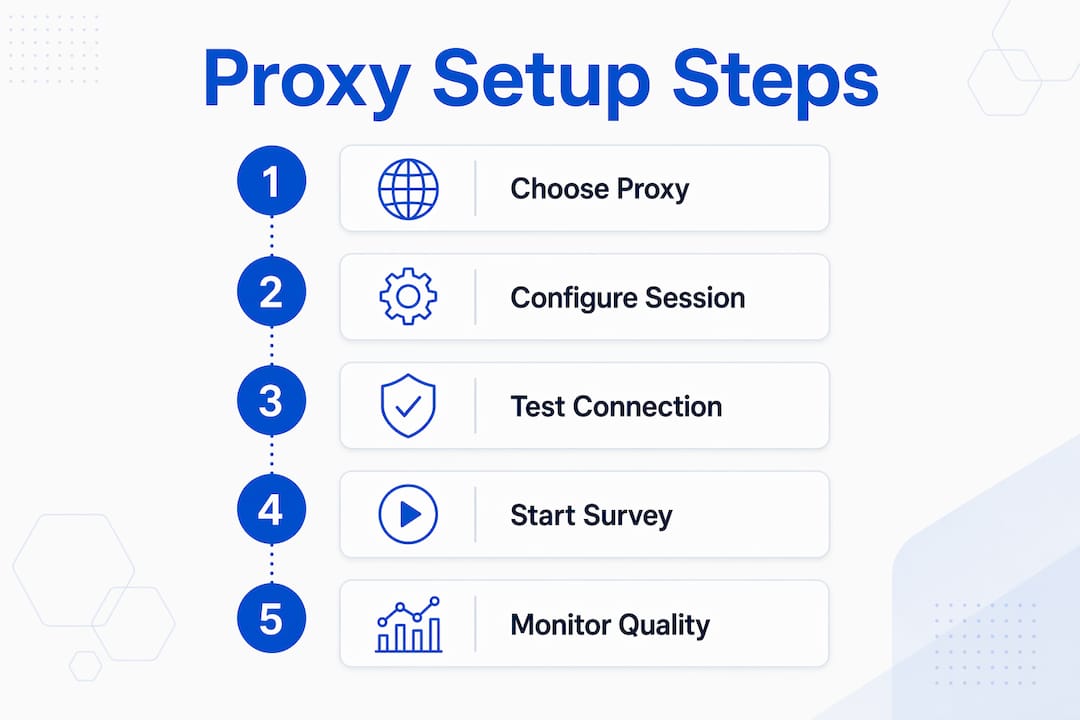
Correct configuration separates a productive survey session from a wasted one. Follow these steps to get it right from the start.
- Select a provider with city-level geo-targeting. Providers like Bright Data, NetNut, and Decodo support username parameters that pin your IP to a specific city. Generic country-level targeting is often too broad for panel qualification.
- Configure the proxy location to match survey requirements exactly. Most providers allow geo-targeting via username parameters. For example, appending a city code like "cityLos` to your credentials fixes your IP location to Los Angeles for the duration of the session.
- Enable sticky sessions for the full survey duration. Rotating or unstable proxy IPs during a survey session appear suspicious to fraud detection systems and trigger disqualification. Set sticky session duration to 20 to 30 minutes, or longer for complex surveys.
- Verify your IP location before starting. Use ipinfo.io or a similar tool to confirm the proxy IP resolves to the correct city and ISP. Do not skip this step.
- Configure the proxy at the browser or system level. Browser-level configuration via extensions like FoxyProxy gives you per-tab control. System-level configuration routes all traffic through the proxy, which is preferable for survey tools that open in standalone windows.
- Disable WebRTC in your browser. WebRTC can leak your real IP even when a proxy is active. In Chrome, use an extension like WebRTC Leak Prevent. In Firefox, set
media.peerconnection.enabledto false in about:config. - Maintain a consistent browser profile. Use the same browser fingerprint, language settings, and time zone that match the proxy IP’s location. Inconsistencies between browser metadata and IP location are a common detection trigger.
Pro Tip: Use a dedicated browser profile for each survey session. Tools like Multilogin or GoLogin let you pair a specific proxy IP with a matching browser fingerprint, which significantly reduces detection risk on sophisticated survey platforms.
The table below summarizes the key configuration variables and their recommended settings for survey research.
| Configuration variable | Recommended setting | Why it matters |
|---|---|---|
| Session type | Sticky (not rotating) | Prevents IP changes mid-survey that trigger fraud detection |
| Session duration | 20 to 30 minutes minimum | Covers typical survey completion time without IP rotation |
| Geo-targeting level | City-level | Matches panel qualification filters precisely |
| WebRTC | Disabled | Prevents real IP leaks through browser media APIs |
| Browser profile | Dedicated per session | Avoids fingerprint conflicts that signal bot behavior |
Ethical and quality considerations for proxy use in surveys
Using a residential proxy for data collection is legitimate when the purpose is quality control, access verification, or anonymized research. It becomes a compliance problem when used to fake responses, automate reward collection, or bypass platform limits. Legitimate research use differs sharply from fraudulent activity, and the line is clear enough that most institutional review boards and platform terms of service address it directly.
The ethical framework for proxy use in survey research rests on several principles:
- Use IP data only for quality control, then delete it. ISO 20252:2019 requires that IP addresses collected during surveys be used solely for quality checks and deleted immediately after those checks are complete, before any substantive analysis begins.
- Store IP data separately from response data. Quality control IP data must be kept in a separate file and dropped before analysis to prevent retaining personal identifiers longer than necessary.
- Configure survey platforms to limit IP tracking where appropriate. Tools like SurveyMonkey offer an anonymous response mode that disables IP collection entirely. Researchers should evaluate whether IP tracking is necessary for their specific study design.
- Apply data-quality flags rather than automatic exclusions. Gallup’s methodology guidance notes that careless responses represent approximately 2% of respondents in probability-based panels. The recommended approach is to flag these responses for sensitivity analyses rather than exclude them outright, which prevents bias.
- Document proxy and IP data handling in your data management plan. Transparency in methodology is required under the AAPOR Code of Ethics, which calls for clarity on sampling and privacy implications in research that involves proxy-mediated access.
Proxy anonymity is operational and contextual. Actual respondent privacy depends on the overall survey system design, including platform settings, data storage practices, and retention policies, not just the presence of a proxy IP.
The practical takeaway is straightforward. Audit your survey collector settings, document your IP data handling procedure, and treat IP addresses as personal data from the moment of collection. Proxies provide a layer of operational anonymity, but they do not substitute for a properly designed data management plan.
Troubleshooting common issues with residential proxies in surveys
Even well-configured proxy sessions encounter problems. These are the most frequent failure points and how to resolve them.
- Screen Out errors due to geo-location mismatch. If the survey platform rejects your connection based on location, verify the proxy IP using ipinfo.io before retrying. Survey platform restrictions using IP location are the leading cause of Screen Out errors. Switch to a provider that supports city-level targeting if country-level IPs are insufficient.
- Conflicting session data from cached browser state. Clear your browser cache and cookies completely before each survey session. Residual cookies from previous sessions can carry location or identity signals that conflict with your current proxy IP.
- Real IP leaks through WebRTC. Even with a proxy active, WebRTC can expose your actual IP to the survey platform. Confirm WebRTC is disabled using a leak test at browserleaks.com before starting any session.
- IP rotation mid-survey triggering fraud detection. Proxy session instability is a primary trigger for survey platform fraud detection systems. Confirm your provider’s sticky session feature is active and set to a duration that exceeds your expected survey completion time.
- Response time sensitivity causing timeouts. Some survey platforms flag unusually slow response times as bot behavior. Use a proxy server geographically close to the survey platform’s servers to minimize latency. If your provider offers speed tiers, select the highest available for survey work.
- Persistent geo-targeting failures. If repeated attempts fail despite correct configuration, contact your proxy provider’s support team directly. Providers with dedicated research support, like those offering city-level geo-targeting, can diagnose whether the issue is on the IP pool side or the platform side.
Pro Tip: Run a full pre-session checklist before every survey: verify IP location, confirm WebRTC is off, clear browser state, and check sticky session status. Five minutes of verification prevents a disqualified session that cannot be recovered.
Key takeaways
A residential proxy for survey research works because it presents a real ISP-assigned IP that passes platform location validation, maintains session continuity, and supports ethical data handling when configured correctly.
| Point | Details |
|---|---|
| Geo-targeting precision | City-level IP matching is required for most panel qualification filters, not just country-level. |
| Sticky session duration | Set sessions to 20 to 30 minutes minimum to prevent mid-survey IP rotation and disqualification. |
| IP data ethics | ISO 20252 requires deleting IP addresses immediately after quality checks, before any analysis. |
| WebRTC leak prevention | Disable WebRTC in every browser session to prevent real IP exposure through media APIs. |
| Data quality flags | Flag suspicious responses for sensitivity analysis rather than excluding them automatically. |
What I’ve learned from using residential proxies in survey research
After working with proxy-mediated survey research across multiple markets, the single most consistent failure point is geo-targeting precision. Researchers often assume country-level targeting is sufficient, then spend hours troubleshooting Screen Out errors that trace back to a city-level mismatch. The fix is always the same: use a provider that supports username-level geo-targeting parameters and verify the resolved IP before every session.
The cost question comes up often, and the honest answer is that pay-as-you-go residential proxy pricing is almost always justified by the alternative. A disqualified survey session in a hard-to-reach demographic costs far more in recruiter time and panel fees than the proxy bandwidth used to complete it correctly.
On ethics, I’ve seen researchers treat IP masking as a privacy guarantee and skip the data management documentation entirely. That is a compliance risk. Proxy anonymity is contextual, not absolute. The platform’s data policies, your storage practices, and your retention schedule all determine whether respondent privacy is actually protected. Proxies are one layer in that system, not the whole system.
The researchers who get the most consistent results integrate proxy configuration into a repeatable pre-session protocol. They treat it the same way they treat questionnaire pretesting: a fixed procedure that runs every time, without shortcuts.
— Eduard
Hydraproxy residential proxies for survey research
Hydraproxy provides real ISP residential IPs with global coverage, city-level geo-targeting, and configurable sticky sessions built for the demands of survey research. Whether you are running a single-market study or coordinating parallel panels across multiple regions, Hydraproxy’s pay-as-you-go plans give you the flexibility to scale without monthly commitments.
The platform supports rotating and sticky session modes, multiple authentication methods, and instant access with no setup delays. For researchers who need to understand how household IPs function before deploying them in a study, Hydraproxy’s residential proxy use cases page covers practical applications including survey data collection in detail. Visit Hydraproxy to review plans and start with a configuration that fits your research scope.
FAQ
What is a residential proxy for survey research?
A residential proxy for survey research is a real ISP-assigned IP address used to access geo-restricted survey panels while masking the respondent’s actual location. Survey platforms treat these IPs as legitimate household connections, which prevents bot detection and geographic disqualification.
How do residential proxies differ from datacenter proxies for surveys?
Residential proxies carry real ISP reputations that pass survey platform validation checks. Datacenter IPs are flagged as VPNs or bots by most platforms, making them unreliable for panel access. For a detailed comparison, see Hydraproxy’s proxy type breakdown.
What session type should I use for survey research?
Sticky sessions are required for survey research. Rotating IPs mid-survey trigger fraud detection systems and cause disqualification. Set sticky session duration to at least 20 to 30 minutes, or longer for complex multi-page surveys.
Is using a residential proxy for surveys ethical?
Using proxies for legitimate quality control and geo-targeted access is ethical when IP data is handled correctly. ISO 20252:2019 requires that IP addresses be deleted after quality checks and never retained into the analysis phase.
Why do I keep getting Screen Out errors even with a proxy active?
Screen Out errors typically result from a geo-location mismatch between the proxy IP and the survey’s required respondent location, or from WebRTC leaking the real IP. Verify the proxy IP resolves to the correct city using ipinfo.io and confirm WebRTC is disabled before retrying.