How to use ISP proxies for secure infrastructure testing

Running infrastructure validation with standard datacenter proxies is a calculated risk. One flagged IP, one unexpected CAPTCHA challenge, and your entire test run loses integrity. For IT teams and QA engineers who need clean, repeatable results, that kind of interruption is not acceptable. ISP proxies solve this by combining the authenticity of residential-grade IPs with the speed and consistency your test frameworks demand. This guide walks you through prerequisites, execution, troubleshooting, and benchmarking so your next infrastructure test runs without interference.
Table of Contents
- Why choose ISP proxies for infrastructure testing
- Tools and prerequisites for ISP proxy-based testing
- Step-by-step: Executing infrastructure tests with ISP proxies
- Troubleshooting and optimizing your ISP proxy testing process
- Validating and benchmarking proxy test results
- The uncomfortable truth about ISP proxy testing most guides skip
- Where to go next: Professional proxy solutions for infrastructure testing
- Frequently asked questions
Key Takeaways
| Point | Details |
|---|---|
| Superior detection resistance | ISP proxies are less likely to be blocked, making them ideal for sensitive infrastructure testing. |
| Plan for IP rotation | Avoid outages by managing static IP burns and using rotation strategies. |
| Benchmark performance carefully | Success depends on tracking connection latency, concurrency, and error patterns. |
| Choose the right tools | The best infrastructure tests combine ISP proxies with robust monitoring and replacement workflows. |
Why choose ISP proxies for infrastructure testing
With the challenge framed, let’s define what sets ISP proxies apart from other proxy types you might consider for infrastructure testing.
ISP proxies are IP addresses assigned directly by Internet Service Providers to real users, but hosted on data center hardware. That combination gives you the detection resistance of a residential IP and the low latency of a server-grade connection. For infrastructure testing, this matters because target systems use IP reputation scoring, ASN lookups, and behavioral fingerprinting to filter out automated traffic.
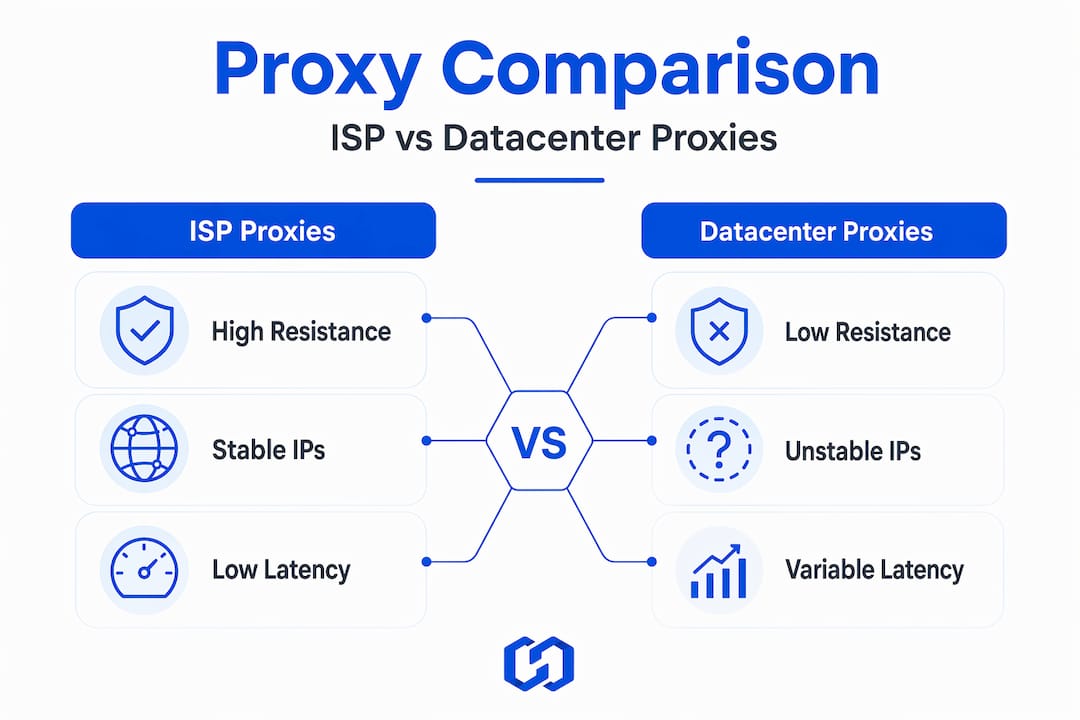
Proxy type key differences become critical when you are running validation at scale. A datacenter IP is easy for modern anti-bot systems to identify. A residential IP is harder to detect but often slower and less stable. ISP proxies sit in the optimal position between both.
In one published detection benchmark, ISP and static proxies showed higher success rates than datacenter proxies and were competitive with mobile and residential options depending on the target system. That 91.2% success rate benchmark is a meaningful operational advantage when you are running hundreds or thousands of test requests.
Comparison: proxy types for infrastructure testing
| Proxy type | Detection resistance | Latency | IP stability | Best use case |
|---|---|---|---|---|
| Datacenter | Low | Very low | High | Internal/non-sensitive tests |
| Residential | High | Medium | Medium | Geo-targeted validation |
| ISP | High | Low | High | Production infrastructure tests |
| Mobile | Very high | Medium | Low | App-level and carrier tests |
The choice between static and rotating ISP proxies also affects your testing strategy. Static ISP IPs give you session continuity, which is essential for stateful tests like login flows or multi-step API validation. Rotating ISP IPs distribute risk across a larger pool, reducing the impact of any single IP being flagged.
Understanding modern proxy services helps you match the right configuration to each test scenario rather than applying a one-size approach.
Pro Tip: For long-running test sessions, start with static ISP IPs to establish session continuity. Keep a rotation pool ready to swap in immediately if any IP triggers a challenge response.
Tools and prerequisites for ISP proxy-based testing
Now that you know why to choose ISP proxies, it’s critical to have the right foundation in place before launching your infrastructure testing workflow.
Before you write a single test request, your environment needs to be correctly configured. Missing a key component at this stage leads to inconsistent results that are difficult to diagnose later.
Essential software and components:
- A test framework capable of proxy integration (such as Playwright, Selenium, or a custom HTTP client)
- A proxy configuration utility or middleware layer to route requests through your ISP proxy pool
- A monitoring and logging tool to capture response codes, latency values, and error patterns
- An IP validation tool to confirm that each proxy IP resolves to the correct ISP and geography
- A concurrency management layer to control request volume and avoid rate-limit triggers
On the provider side, your ISP proxy service must supply authentic ISP-registered IPs, not rebranded datacenter blocks. Verify ASN ownership before committing to a provider. Protocol support matters too. HTTP, HTTPS, and SOCKS5 coverage gives you flexibility across different test targets.
Geography selection directly affects your results. Proxy performance benchmarks confirm that protocol and geography strongly affect connection latency, first-byte latency, throughput, concurrency capacity, and error rate. Small per-request latency differences compound significantly at scale, which means a 30ms difference per request becomes 30 seconds across 1,000 sequential calls.
Key performance metrics to track:
| Metric | Description | Target threshold |
|---|---|---|
| Connection latency | Time to establish TCP connection | Under 200ms |
| First-byte latency | Time to receive first response byte | Under 500ms |
| Throughput | Data transferred per second | Consistent with bandwidth tier |
| Concurrency capacity | Simultaneous connections handled | Matches test load plan |
| Error rate | Percentage of failed requests | Below 2% |
| DNS resolution time | Time to resolve hostname | Under 100ms |
Knowing how to test proxies before you integrate them into your main test suite saves significant debugging time. Run a baseline validation pass with a small request sample first.
Step-by-step: Executing infrastructure tests with ISP proxies
With all tools and prerequisites ready, you’re set to move into execution, the practical, step-by-step phase of ISP proxy-enabled infrastructure testing.

1. Validate your proxy pool before testing Pull your full list of ISP proxy IPs and run each through an ASN and geolocation check. Confirm that every IP resolves to the correct ISP, not a datacenter block. Remove any IPs that fail this check before they enter your test rotation.
2. Configure your test suite for proxy integration Set your HTTP client or test framework to route all outbound requests through the proxy pool. Use connection pooling to manage concurrency efficiently. Set appropriate timeout values to distinguish between slow responses and actual failures.
3. Run a small-scale pilot test Before full execution, send 50 to 100 requests through your proxy configuration. Monitor response codes closely. A high rate of 403 or 429 responses at this stage indicates either IP quality issues or rate-limit misconfiguration.
4. Implement full performance measurement Protocol-level timing should include connection latency, first-byte latency, and DNS resolution time, not just end-to-end response time, because these components add hidden latency variance under concurrency. Log all four values for every request.
5. Monitor for ban and challenge signals Watch your logs for CAPTCHA responses, redirect chains to verification pages, or sudden spikes in response time. These are early signals that an IP is being challenged. Flag that IP immediately and route subsequent requests through a replacement.
6. Document all anomalies Every ban, CAPTCHA, or unexpected response code must be logged with the associated IP, timestamp, and target endpoint. This data is essential for post-test analysis and for validating that your results reflect actual infrastructure behavior rather than proxy interference.
“Accurate infrastructure test data depends on clean proxy operation. Any unresolved IP challenge that goes unlogged introduces noise into your results that cannot be removed after the fact.”
Pro Tip: Set automated alerts for response code anomalies above a defined threshold. Catching a challenged IP within the first 10 requests prevents it from contaminating a larger data set.
A modern proxy approach integrates monitoring directly into the test pipeline rather than treating it as a separate post-run activity.
Troubleshooting and optimizing your ISP proxy testing process
Successful test execution is only valuable if you understand how to spot and recover from common issues, especially bad IP burns and connectivity bottlenecks.
The most operationally damaging problem in ISP proxy testing is a bad IP burn. A bad IP burn occurs when a static ISP IP is banned or challenged, reducing your effective coverage until you rotate or replace it. With static IPs, a single ban stays active until you act. This is different from rotating residential proxies where the next request automatically uses a new IP.
Top troubleshooting practices:
- Monitor HTTP response codes in real time. Codes 403, 429, and 503 are the most common ban or rate-limit signals.
- Separate your proxy pool into primary and reserve groups. When a primary IP is flagged, the reserve group takes over without interrupting the test run.
- Analyze error patterns by IP address, not just by endpoint. If one IP generates 80% of your errors, the problem is the IP, not the target system.
- Check DNS resolution consistency. An ISP proxy that returns inconsistent DNS results can produce false positives in your infrastructure test data.
- Rotate IPs proactively on long sessions rather than waiting for a ban signal. Scheduled rotation every 30 to 60 minutes reduces cumulative detection risk.
Understanding residential proxy sourcing also informs how you evaluate ISP proxy quality. Providers who source IPs from verified ISP allocations rather than reassigned blocks deliver more consistent performance.
Pro Tip: If you are running tests at scale, build auto-rotation logic directly into your proxy middleware. Define a maximum request count per IP before automatic replacement, regardless of whether a ban signal has been received.
Validating and benchmarking proxy test results
With your troubleshooting complete, it’s time to benchmark your outcomes, measuring not only proxy stability but also your broader infrastructure readiness.
Validation is the step most teams skip when they are under deadline pressure. Skipping it means you cannot distinguish between infrastructure performance issues and proxy-induced artifacts in your data.
Steps to validate your test results:
- Cross-reference your error log against the list of IPs that were challenged or banned during the run. Remove any requests associated with those IPs from your performance calculations.
- Compare your measured latency values against the baseline you established during the pilot test. Significant deviation indicates either infrastructure change or proxy degradation.
- Review DNS resolution times separately. Elevated DNS times that appear only on specific IPs suggest ISP-level routing issues rather than target system problems.
- Verify geographic consistency. Confirm that each request was routed through the intended geographic location by checking the IP geolocation in your logs.
- Generate a summary report that separates clean test data from flagged or anomalous requests. This gives stakeholders an accurate picture of infrastructure performance.
Proxy performance benchmarks reinforce that geography and protocol choices directly affect every metric you measure. Your benchmark report should note which protocol and geography configuration was used so results are reproducible.
Benchmark comparison: ISP vs. other proxy types
| Metric | ISP proxies | Datacenter proxies | Residential proxies |
|---|---|---|---|
| Detection resistance | High | Low | High |
| Latency | Low | Very low | Medium |
| Success rate | ~91% | ~70-75% | ~85-90% |
| Session stability | High | High | Medium |
| Ban recovery speed | Medium | Fast | Fast |
After validation, plan your next test cycle with updated IP pools and refined concurrency settings. Residential proxy potential can supplement ISP proxy coverage for geo-specific validation scenarios where ISP IPs are not available in certain regions.
The uncomfortable truth about ISP proxy testing most guides skip
Most guides treat ISP proxies as a plug-and-play solution. Run the test, collect the data, move on. That works until it doesn’t.
Here is what we have seen repeatedly: teams invest in high-quality ISP proxies, achieve strong initial success rates, and then encounter a cascading failure mid-run because two or three static IPs were quietly banned hours earlier. No alert was triggered. No rotation was in place. The test data from those IPs looks valid but is not.
The issue is not the proxy quality. It is the assumption that high success rates eliminate the need for active IP management. Static ISP proxy selection requires a coverage and rotation plan, because bans on specific IPs can significantly slow or interrupt infrastructure validation runs even when the overall pool is performing well.
Our position: treat IP management as a first-class part of your test infrastructure, not an afterthought. Define rotation policies before the test starts. Build replacement logic into your tooling. Log IP-level performance separately from endpoint-level performance. These are not optional steps for enterprise-scale operations.
The teams that get the most reliable results from ISP proxies are the ones who plan for failure from the start. A modern proxy guide that addresses IP lifecycle management gives you a framework that holds up under real operational pressure, not just ideal conditions.
Where to go next: Professional proxy solutions for infrastructure testing
After exploring technical best practices, if you’re looking to accelerate and safeguard your infrastructure validation, specialized proxy services are the logical next step.
At Hydraproxy, we provide ISP, residential, and mobile proxy networks built for exactly the kind of high-stakes infrastructure testing this guide covers. Our pools include authentic ISP-registered IPs with verified ASN ownership, flexible rotation controls, and support for HTTP, HTTPS, and SOCKS5 protocols.
You can explore proxy testing methods directly on our platform, or review mobile proxy options if your test scope includes carrier-level validation. Our infrastructure supports unlimited bandwidth, sticky and rotating session modes, and multiple authentication methods. No monthly commitments and a money-back guarantee mean you can validate our service against your specific test requirements before committing at scale. Visit HydraProxy to get started.
Frequently asked questions
What makes ISP proxies better for infrastructure testing than datacenter proxies?
ISP proxies carry authentic ISP-registered IP addresses that score much higher on reputation checks, making them significantly harder to detect or block. In a published detection benchmark, ISP proxies outperformed datacenter proxies on success rate across multiple test target sets.
Should I use static or rotating ISP proxies for infrastructure tests?
Static ISP proxies provide session continuity for stateful tests, while rotating proxies reduce the risk of coverage loss from IP bans. A bad IP burn on a static address can reduce your effective test coverage until you manually replace it, so most enterprise setups benefit from having both options available.
How do I benchmark the performance of ISP proxies in my test setup?
Measure connection latency, first-byte latency, DNS resolution time, throughput, concurrency capacity, and error rate. Performance benchmarks show that geography and protocol choice strongly affect all of these metrics, so document both variables in your benchmark reports.
What is a “bad IP burn” and how do I avoid it?
A bad IP burn occurs when a static ISP IP is banned, removing it from your effective pool until you rotate or replace it. Avoid it by implementing proactive rotation schedules, real-time response code monitoring, and a pre-configured reserve IP pool that activates automatically when a primary IP is flagged.