An ISP proxy is a proxy server operated or provided by an Internet Service Provider. It routes user traffic through ISP-owned IP addresses, often residential, making requests appear as if from real households. This improves anonymity, bypasses restrictions, and is commonly used for web scraping, ads verification, or SEO.
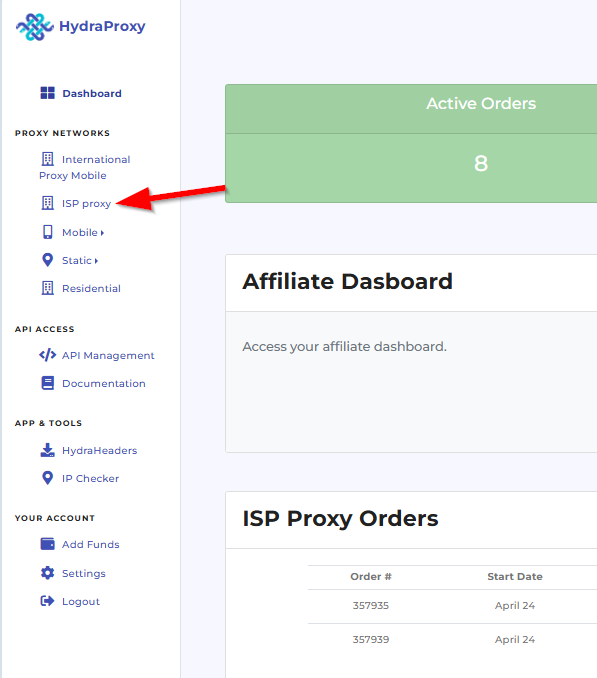
a. First you need to click on the ISP proxy section in your dashboard
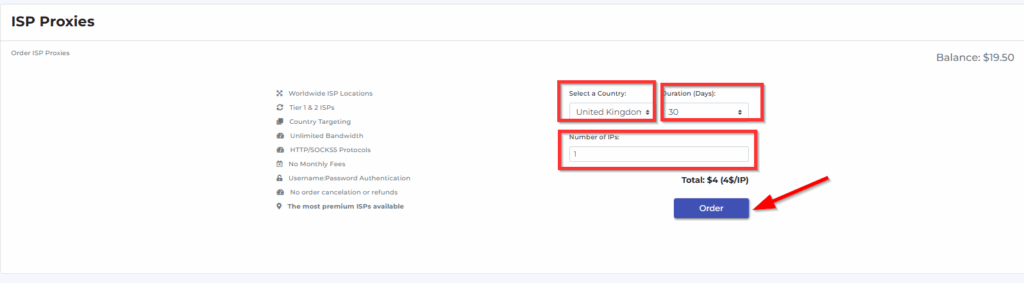
b. Here you can select the ISP proxy location, proxy validity period (for now only 30 day plan is available) and the number of proxies (if you need more than one ip – note that you are purchasing multiple proxies from same country, you cannot select or change to other countries after placing the order). After that you just need to click on the “Order” button and that is basically it.
c. In order to see the proxy details you need to go to “ISP Proxy Orders” section in your dashboard and click on the “Manage access” button. Delivering the ISP proxies is not instant and sometimes it could take up to 15-20 minutes to retrieve the proxy.

d. Here you have the following 2 cards:
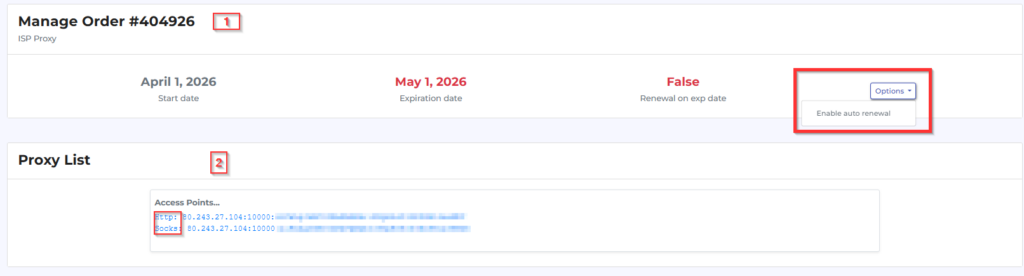
In the first card you have the Start and Expiration date, and from option button you can select the option to autorenew (you will need to have funds in your balance)
In the second card you have the proxy details which are the same for both HTTP and SOCKS protocol excepting the proxy protocol:
for HTTP port 50100
for SOCKS port 50101