How Proxies Handle HTTPS Traffic: A Developer’s Guide

Most developers assume proxies either see everything or see nothing when HTTPS traffic passes through them. Neither is fully accurate. Understanding how proxies handle HTTPS traffic requires separating two fundamentally different mechanisms: tunneling and interception. These operate on distinct trust models and produce very different results for privacy, security, and data visibility. Whether you are building a proxy integration, configuring enterprise traffic inspection, or routing requests through a residential proxy network, knowing which mode applies to your setup determines what the proxy can and cannot access.
Table of Contents
- Key takeaways
- How proxies handle HTTPS traffic via CONNECT tunneling
- TLS interception: how proxies decrypt and re-encrypt HTTPS
- Modern protocol support: HTTP/2 and HTTP/3 in proxy tunneling
- Security considerations and practical limits
- My take on HTTPS proxy misconceptions
- Hydraproxy for secure HTTPS proxy deployments
- FAQ
Key takeaways
| Point | Details |
|---|---|
| CONNECT tunneling is the default | Standard proxies use the HTTP CONNECT method to forward encrypted traffic without decrypting it. |
| Interception requires client trust | TLS interception proxies only work when the client trusts the proxy’s root CA certificate. |
| Proxies cannot encrypt traffic themselves | Encryption depends entirely on the TLS session between client and server, not the proxy. |
| HTTP/3 breaks traditional proxy models | QUIC runs over UDP, requiring new architectures like MASQUE that most proxies do not yet support. |
| Certificate pinning blocks interception | Apps with pinned certificates will reject proxy-generated certs, causing connection failures. |
How proxies handle HTTPS traffic via CONNECT tunneling
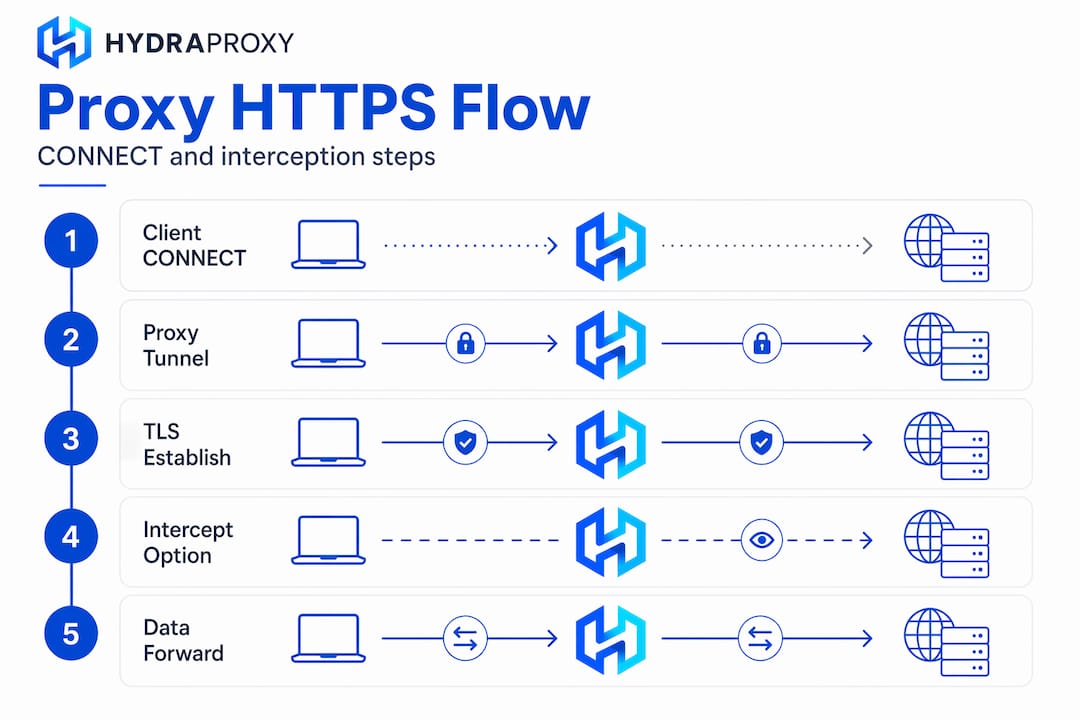
When a client sends an HTTPS request through a forward proxy, the proxy does not see the request content. Instead, the client issues an HTTP CONNECT request to the proxy, specifying the destination host and port, for example: "CONNECT api.example.com:443 HTTP/1.1. The proxy responds with 200 Connection Established`, opens a TCP connection to the target server, and from that point forward blindly forwards encrypted bytes without inspecting them.
The TLS handshake happens directly between the client and the origin server, passing through the proxy as opaque binary data. The proxy has no access to the session keys, the certificate details, or the request payload. It only knows the destination hostname and IP address from the initial CONNECT request. This is the standard behavior for proxies and HTTPS, and it is what most residential and forward proxy services implement.
The security implications here are significant. Because the proxy never touches the TLS session, the client’s certificate validation against the origin server remains intact. The origin server’s certificate is verified by the client directly, with no proxy interference. This model preserves end-to-end encryption and is why proxies cannot encrypt HTTPS traffic themselves. They relay it.
- Client sends
CONNECT destination.com:443to the proxy. - Proxy opens a TCP socket to
destination.com:443. - Proxy responds
200 Connection Establishedto the client. - Client initiates TLS handshake directly with the origin server.
- Proxy forwards all subsequent bytes in both directions without modification.
Pro Tip: If you need to verify that your proxy is not intercepting traffic, check whether the TLS certificate presented to your client is issued by the origin’s CA or by an unknown intermediate. If it is the latter, you are behind an interception proxy.
TLS interception: how proxies decrypt and re-encrypt HTTPS
TLS interception proxies operate very differently. Rather than forwarding the encrypted tunnel, they terminate the client’s TLS connection themselves and establish a separate TLS session to the origin server. This is the man-in-the-middle approach that tools like mitmproxy implement for traffic inspection.
Here is how the full interception chain works technically:
- The client sends a CONNECT request as normal.
- The proxy responds with
200 Connection Establishedbut then hijacks the TCP socket usinghttp.Hijackeror an equivalent mechanism. - The proxy generates a dynamic certificate for the target domain, signed by its own root CA.
- The client completes a TLS handshake with the proxy, not the origin server.
- The proxy simultaneously opens its own TLS connection to the origin server, verifying the origin’s real certificate.
- The proxy decrypts the client’s request, inspects or modifies it, then re-encrypts and forwards it to the origin.
The critical dependency in this model is client trust. The proxy’s root CA must be installed in the client’s trust store. Without that, the client will reject the proxy-generated certificate and the connection will fail. This is why enterprise security products ship with group policy deployments that push the proxy CA to all managed devices.
Certificate management in MITM proxies is non-trivial. Dynamic cert generation requires expiry management and caching to avoid performance degradation over long device uptimes. mitmproxy, for instance, maintains a CertStore that caches generated certificates per domain to avoid regenerating them on every connection.

Common use cases include enterprise DLP (data loss prevention), content filtering, and security auditing. The certificate trust shifts from the origin CA to the proxy CA, but the encryption itself remains intact at each segment of the connection.
Pro Tip: When deploying an interception proxy in a development environment, generate a dedicated root CA per environment and never reuse production CAs. This limits the blast radius if the CA private key is ever exposed.
Modern protocol support: HTTP/2 and HTTP/3 in proxy tunneling
Protocol evolution creates real complexity for proxy deployments. HTTP/2 and HTTP/3 behave differently at the transport layer, and proxies must adapt accordingly.
| Protocol | Transport | Proxy CONNECT support | Key challenge |
|---|---|---|---|
| HTTP/1.1 | TCP | Native | None |
| HTTP/2 | TCP | Supported | Multiplexing over single tunnel |
| HTTP/3 | UDP (QUIC) | Requires MASQUE | Most proxies lack UDP tunneling |
HTTP/2 works naturally with CONNECT tunneling. Many forward proxies support HTTP/2 between the client and the proxy while maintaining a standard HTTPS tunnel to the target server. The proxy and the origin may negotiate their own HTTP version independently. Multiplexing over a single TCP connection passes through the tunnel without issue.
HTTP/3 is a different matter entirely. QUIC runs over UDP, not TCP, and requires new proxy architectures like IETF MASQUE and the CONNECT-UDP extension to proxy HTTP/3 traffic properly. Most existing proxy products assume TCP-based architectures and have no native support for UDP tunneling. This means that HTTP/3 traffic frequently falls back to HTTP/2 or HTTP/1.1 when routed through a proxy, depending on how the client handles the negotiation.
The curl project implemented experimental HTTP/3 proxy support via --proxy-http3 and proxyudptunnel flags, which signals where the industry is heading. But production-grade MASQUE support remains limited across the proxy ecosystem in 2026. Developers building proxy-dependent pipelines should explicitly test HTTP version negotiation and not assume HTTP/3 will pass through correctly.
Security considerations and practical limits
Understanding the security posture of your proxy deployment requires more than knowing whether it tunnels or intercepts. Several practical constraints affect how reliably proxies manage HTTPS traffic in real deployments.
- CONNECT method abuse: Unrestricted CONNECT proxies can be used to reach arbitrary destinations, including internal network resources. RFC 9113 recommends applying limits on allowed CONNECT targets and logging usage to mitigate connection-flood risks.
- Certificate pinning failures: Apps that implement certificate pinning verify the server’s exact public key. When an interception proxy substitutes its own certificate, the pinned connection fails. Mobile apps, banking clients, and many APIs use pinning, which means interception proxies require explicit exceptions for these endpoints.
- Proxy environment variable bypass: Setting
HTTPS_PROXYin your environment does not guarantee all traffic routes through the proxy. Some libraries and subprocesses ignore this variable entirely, creating unexpected direct connections that bypass your proxy configuration. - No proxy-side encryption: A proxy does not add TLS to unencrypted traffic. If the origin does not support HTTPS, the proxy cannot upgrade the connection. Encryption depends entirely on the TLS session negotiated between endpoints.
- Client diversity in enterprise deployments: Different operating systems, browsers, and runtimes maintain separate trust stores. Installing a root CA on Windows does not automatically apply it to Firefox, Java, or Python’s
certifibundle. Each trust store requires independent configuration.
Pro Tip: When enforcing proxy routing in a development or CI environment, use a transparent proxy with iptables rules to intercept traffic at the network level rather than relying on application-level environment variables. This eliminates the bypass problem entirely.
Developers building or integrating secure proxy infrastructure should audit which clients in their stack honor proxy settings and which do not before assuming full traffic coverage.
My take on HTTPS proxy misconceptions
I have seen developers get this wrong in both directions. Some assume that routing traffic through a proxy automatically adds privacy or encryption. It does not. Others assume that any proxy can inspect HTTPS traffic, which leads to misplaced concern about residential proxies reading request payloads. Neither assumption holds up under scrutiny.
The more interesting misconception is about TLS interception. Many developers treat it as “breaking” encryption, but that framing is technically imprecise. What interception proxies actually do is shift the trust anchor from the origin CA to the proxy CA. Encryption remains present at every segment of the connection. The question is whether you trust the proxy operator with that decryption capability, which is a governance question, not a cryptographic one.
Certificate pinning is where I have seen the most real-world pain. Developers deploy an interception proxy for traffic inspection, then spend hours debugging why specific API calls fail. The answer is almost always pinning. The fix requires either disabling pinning for the affected client (which reduces security) or configuring the proxy to pass those connections through without interception. Neither option is clean.
On the protocol side, the HTTP/3 situation is genuinely unsolved for most proxy deployments. If your application negotiates HTTP/3 and your proxy does not support MASQUE, you will get silent fallback behavior that is difficult to detect without packet-level inspection. I would recommend explicitly disabling HTTP/3 in proxy-dependent environments until MASQUE support matures.
For developers choosing a proxy service, understanding how HTTPS proxies work at the protocol level is the difference between a configuration that works reliably and one that fails unpredictably under load or protocol negotiation edge cases.
— Eduard
Hydraproxy for secure HTTPS proxy deployments

If you are building data collection pipelines, running ad verification, or testing geo-restricted content, you need a proxy network that handles HTTPS traffic reliably without introducing interception risks. Hydraproxy’s residential proxy network uses standard CONNECT tunneling, meaning your TLS sessions remain intact between your client and the origin server. No certificate substitution, no trust store modifications required.
Hydraproxy supports rotating and sticky IP sessions, multiple authentication methods, and unlimited bandwidth across residential, mobile, and ISP proxy types. If you are evaluating options, the residential proxy buying guide covers what to look for in a provider when HTTPS handling and privacy are priorities. Setup is instant, with no monthly commitments and a money-back guarantee.
FAQ
What does a proxy see in HTTPS traffic?
In standard CONNECT tunneling mode, a proxy only sees the destination hostname and IP address. It cannot read the encrypted request or response payload because the TLS session runs directly between the client and the origin server.
How does TLS interception work in a proxy?
An interception proxy terminates the client’s TLS connection using a dynamically generated certificate signed by its own root CA, then establishes a separate TLS session to the origin. This requires the proxy’s CA to be trusted by the client.
Does using a proxy encrypt my HTTPS traffic?
No. A proxy does not add encryption. HTTPS encryption depends on the TLS session negotiated between your client and the origin server. The proxy either forwards that encrypted tunnel or, if configured for interception, manages two separate TLS sessions.
Why does certificate pinning break with interception proxies?
Certificate pinning verifies that the server presents a specific public key. When an interception proxy substitutes its own certificate, the pinned key no longer matches, causing the connection to fail. Pinned clients require explicit bypass configuration on the proxy.
Can proxies handle HTTP/3 traffic?
Most proxies cannot handle HTTP/3 natively because QUIC runs over UDP rather than TCP. Proper HTTP/3 proxying requires MASQUE and CONNECT-UDP support, which remains experimental in most proxy implementations as of 2026.