Short answer: for most scraping of public data, use rotating residential proxies when you need many locations and want to pay per GB, mobile proxies when the target depends on the network type, and static ISP proxies when you need one stable IP for long sessions. Configure the proxy in your HTTP client, rotate between requests, retry on 429 and timeouts, never retry a 407, and keep your request rate polite.
This guide covers how to pick a type, working code for the most common tools, and how to estimate cost before you buy.
Use proxies for public data and legitimate testing only: market research, price monitoring, ad verification, SEO checks and QA. Respect each site’s terms and robots.txt, and keep request rates reasonable.
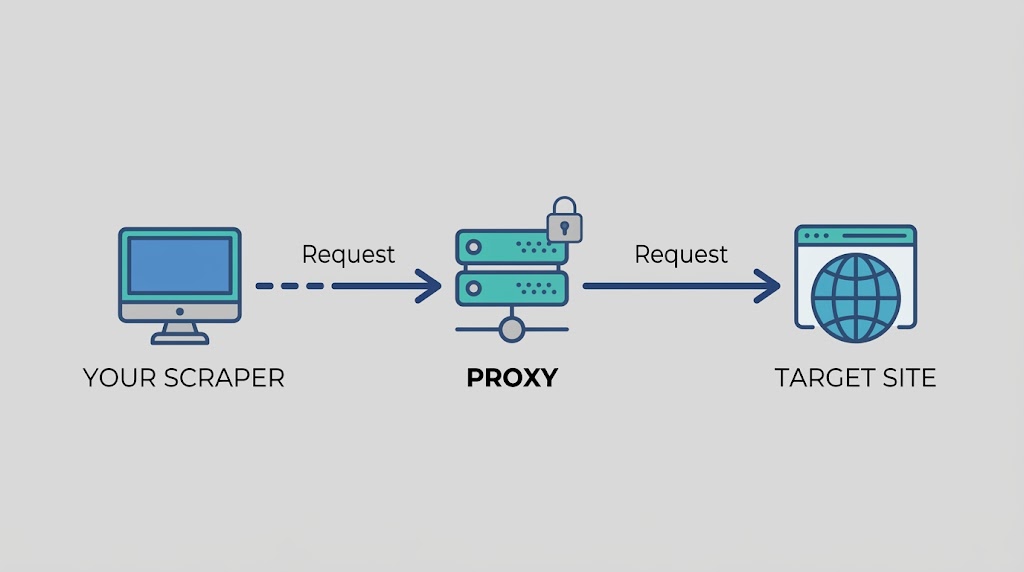
Why scrapers use proxies
A single IP sending many requests is easy for a site to rate-limit. Proxies let you:
- spread requests across many IPs, so no single address carries all the traffic;
- see a page as users in a specific country or city see it (geo-testing, localized prices);
- keep your own infrastructure’s IP out of the target’s logs.
Proxies do not make a scraper invisible and do not guarantee access. Sites look at IP reputation, request patterns, headers and more. A proxy is one part of a polite, well-behaved scraper.
Proxy types compared
| Type | Best for | Billing model | Rotation |
|---|---|---|---|
| Residential | Wide geo coverage, large crawls, price monitoring | Per GB | Rotating or sticky sessions |
| USA 4G/5G mobile | Mobile-network checks, US-focused tasks, short projects | Per day or period, unlimited bandwidth | Every 5, 10 or 30 minutes |
| Static mobile | Targeting by ISP, city or ZIP code | Per port per day | Static |
| Static ISP | Long sessions that need one stable IP | 30-day plans, unlimited bandwidth | Static |
| Worldwide mobile | 3G/4G/5G in many countries | Per GB tiers | Custom rotation, static IP up to 24h |
How to choose
- Many pages, many countries: residential, billed per GB. Keep pages light and block images and fonts in headless browsers.
- Long runs and predictable cost: mobile or ISP proxies with unlimited bandwidth.
- The same IP across a flow you are authorized to test: static ISP or a sticky residential session.
- You need to see what a mobile user on a US carrier sees: USA 4G/5G mobile proxies.
For a deeper comparison, see rotating vs static residential proxies and static vs rotating mobile proxies.
Setup: credentials format
All examples use placeholders. Replace them with the values from your dashboard:
http://USERNAME:PASSWORD@{PROXY_HOST}:{PORT}
If host and port are new to you, read what a proxy port and address are. Before you scale, confirm the proxy works with how to test proxies.

Python: requests
import requests

PROXY_URL = "http://USERNAME:PASSWORD@{PROXY_HOST}:{PORT}"
proxies = {"http": PROXY_URL, "https": PROXY_URL}

resp = requests.get("https://httpbin.org/ip", proxies=proxies, timeout=30)
print(resp.status_code, resp.json())
The response should show the proxy’s IP, not yours. More detail in Python requests proxy.
Python: httpx
import httpx

PROXY_URL = "http://USERNAME:PASSWORD@{PROXY_HOST}:{PORT}"

with httpx.Client(proxy=PROXY_URL, timeout=30) as client:
    r = client.get("https://httpbin.org/ip")
    print(r.status_code, r.json())
Recent httpx versions use proxy=. Older ones used proxies=, which has been removed, so check your installed version if you get a TypeError.
Python: Scrapy
import scrapy

PROXY_URL = "http://USERNAME:PASSWORD@{PROXY_HOST}:{PORT}"


class IpSpider(scrapy.Spider):
    name = "ip"

    def start_requests(self):
        yield scrapy.Request("https://httpbin.org/ip", meta={"proxy": PROXY_URL})

    def parse(self, response):
        self.logger.info(response.text)
Scrapy’s built-in HttpProxyMiddleware reads the credentials from the URL. For a project-wide middleware, rotation and throttle settings, see Scrapy proxy setup.
Python: Playwright
from playwright.sync_api import sync_playwright

with sync_playwright() as p:
    browser = p.chromium.launch(
        proxy={
            "server": "http://{PROXY_HOST}:{PORT}",
            "username": "USERNAME",
            "password": "PASSWORD",
        }
    )
    page = browser.new_page()
    page.goto("https://httpbin.org/ip", timeout=60_000)
    print(page.inner_text("body"))
    browser.close()
Per-context proxies, bandwidth savings and geo-testing are covered in Playwright proxy setup.
Node.js: fetch with undici
Node’s built-in fetch does not read proxy settings by default. Use undici’s ProxyAgent:
import { fetch, ProxyAgent } from "undici";

const dispatcher = new ProxyAgent("http://USERNAME:PASSWORD@{PROXY_HOST}:{PORT}");

const res = await fetch("https://httpbin.org/ip", { dispatcher });
console.log(res.status, await res.json());
Puppeteer and Selenium follow the same pattern as Playwright: pass the proxy server at launch and authenticate with the username and password. For plain command-line checks, see using curl with a proxy server.
Rotation and sessions
- Rotating: each request, or each time window, uses a new IP. Good for independent page fetches such as product listings.
- Sticky: the same IP is held for a period. Needed when consecutive requests belong to one session.
- Mobile rotation: USA 4G/5G proxies rotate every 5, 10 or 30 minutes depending on your setting.
How you request a sticky session on residential depends on your plan’s settings. Check your dashboard for the exact format instead of guessing parameters.
Handle errors instead of hammering
import random
import time

import requests

PROXY_URL = "http://USERNAME:PASSWORD@{PROXY_HOST}:{PORT}"
proxies = {"http": PROXY_URL, "https": PROXY_URL}


def fetch(url, retries=4):
    for attempt in range(retries):
        try:
            r = requests.get(url, proxies=proxies, timeout=30)
            if r.status_code == 407:
                raise RuntimeError("407: check USERNAME/PASSWORD")
            if r.status_code in (429, 503):
                time.sleep(2 ** attempt + random.random())
                continue
            r.raise_for_status()
            return r
        except (requests.ConnectionError, requests.Timeout):
            time.sleep(2 ** attempt + random.random())
    raise RuntimeError(f"Failed after {retries} attempts: {url}")
| Symptom | Likely cause | What to do |
|---|---|---|
| 407 Proxy Authentication Required | Wrong credentials or IP not allowed | Re-check username, password and the whitelist |
| 429 Too Many Requests | Request rate too high | Add delays, lower concurrency, back off |
| Timeouts | Slow target or network | Raise the timeout, retry with backoff |
| Connection refused | Wrong host or port | Verify {PROXY_HOST} and {PORT} |
For a full breakdown of each error, read proxy errors: what each one means and how to fix it.
Estimate your cost before you buy
Per-GB residential: pages × average page size = GB.
Example (assumed numbers, replace them with yours): 100,000 pages at about 0.5 MB each is about 50 GB. At the $5/GB tier, that is about $250. Block images, fonts and trackers in headless browsers and many pages shrink a lot.
Current residential tiers: $5/GB (1–50 GB), $4/GB (50–150 GB), $3/GB (150 GB–1 TB), $2.50/GB (over 1 TB). There is no monthly commitment, and the minimum is 1 GB.
Time-based mobile: USA 4G/5G starts at $2.95 per day (standard), with 3-day, 7-day and 30-day options. Bandwidth is unlimited, so heavy pages cost nothing extra.
Check the pricing page for current prices.
Scrape responsibly
- Collect public data only, and read the site’s terms and robots.txt.
- Limit concurrency and add delays.
- Do not collect personal data without a legal basis.
- Cache results so you do not request the same page twice.
- Identify your client honestly in the User-Agent, with a contact address.
See are residential proxies legal for more on what is and is not acceptable. If you are new to the topic, start with web scraping vs web crawling and our Python web scraping tutorial.
Next steps
Pick a type from the table, run the test snippet for your tool, then scale gradually while watching error rates and bandwidth. Compare residential proxies (per GB), USA 4G/5G mobile proxies (per day, unlimited bandwidth) and static ISP proxies (30-day plans), or see the pricing page. Every plan comes with a 24-hour money-back guarantee, and support is available 24/7 through live chat and email.
FAQ
What kind of proxy is best for web scraping?
It depends on the job. Residential proxies suit broad geographic coverage and are billed per GB. Mobile proxies suit tasks that depend on mobile networks. Static ISP proxies suit long sessions that need one stable IP.
Do I need rotating proxies for scraping?
Not always. Rotation helps when you fetch many independent pages. If your requests belong to one session, use a sticky session or a static IP.
Why do I get a 407 error with my proxy?
A 407 means the proxy rejected your credentials. Check the username, password, host and port, and URL-encode special characters in the password.
How much does scraping with proxies cost?
With per-GB plans, multiply the number of pages by the average page size. With time-based mobile plans, cost depends on the duration, not the data. Estimate on a small run first.
Is web scraping with proxies legal?
Collecting public data is common practice, but legality depends on the site’s terms, the data you collect and your jurisdiction. Avoid personal data, respect robots.txt and consult a lawyer for high-stakes use.
Can I use proxies with Playwright, Puppeteer or Selenium?
Yes. All three accept a proxy server and credentials at browser launch. See our Playwright proxy guide for a worked example.