Residential Proxy Scraper Setup: 2026 Practical Guide

Getting blocked is the fastest way to kill a scraping project. Without a proper residential proxy scraper setup, your IP gets flagged within minutes on most commercial sites, leaving you with incomplete data, wasted time, and no clear path forward. This guide walks you through every stage of building a working scraper backed by residential proxies: choosing the right provider, configuring rotation and sessions, writing resilient request logic, and monitoring performance over time. Whether you are collecting pricing data, tracking SERP rankings, or gathering competitive intelligence, the same core principles apply.
Table of Contents
- Key Takeaways
- Understanding the residential proxy scraper setup fundamentals
- Preparation before configuring your scraper
- Step-by-step residential proxy configuration
- Troubleshooting common proxy scraper issues
- Verifying and maintaining scraper performance
- My take on what actually works in practice
- How Hydraproxy fits into your scraper infrastructure
- FAQ
Key Takeaways
| Point | Details |
|---|---|
| Residential proxies beat datacenter for strict targets | Use residential IPs when sites deploy advanced anti-bot systems that flag datacenter ranges. |
| Session strategy determines success rate | Sticky sessions of 1 to 5 minutes outperform per-request rotation for most scraping scenarios. |
| Request hygiene matters as much as IP quality | Proper headers and TLS fingerprints can raise success rates by over 9% regardless of proxy quality. |
| Retry logic is not optional | Three retries with fresh IPs and delays can push effective success rates beyond 98%. |
| Start small before scaling | Test with limited batches to validate your configuration before committing to high-volume runs. |
Understanding the residential proxy scraper setup fundamentals
Before touching a single line of configuration, you need a clear picture of what residential proxies actually are and why they behave differently from datacenter alternatives. A residential proxy routes your requests through IP addresses assigned by real internet service providers to real devices. From a website’s perspective, the traffic looks like it comes from an ordinary household user, not a data center.
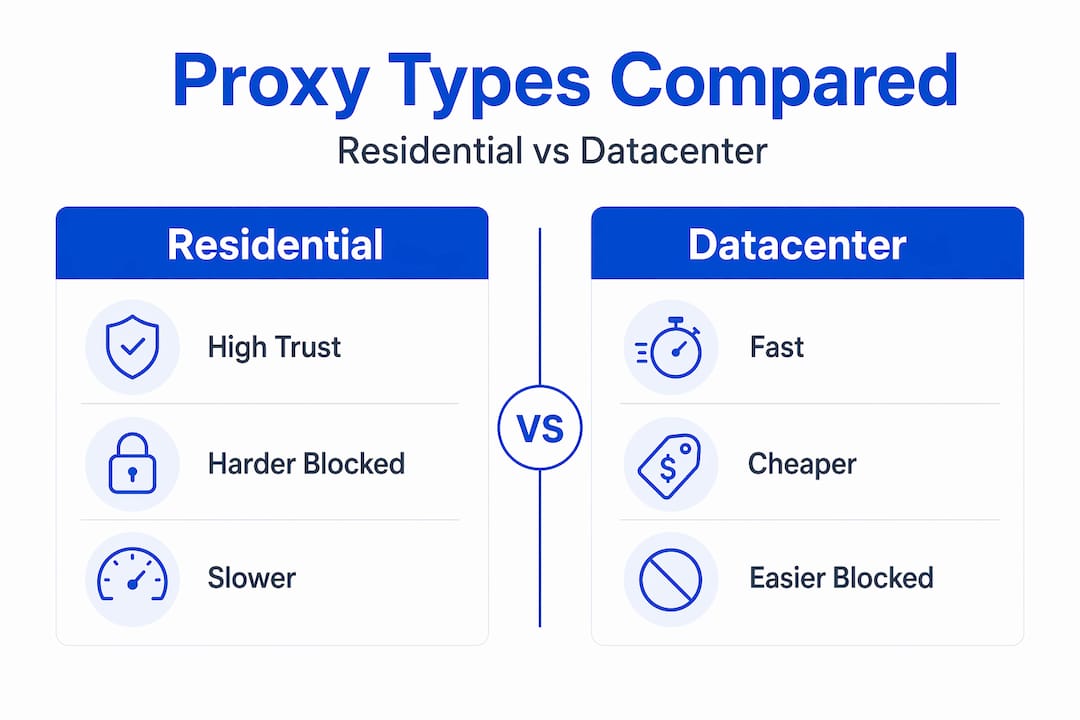
Datacenter proxies come from cloud servers. They are faster and cheaper, but they share IP ranges that security vendors have catalogued extensively. When you hit a target site with a datacenter IP, the site’s anti-bot layer often recognizes the range immediately. Residential IPs carry far more trust because they belong to real consumers.
Here is a direct comparison to guide your proxy type decision:
| Attribute | Residential proxies | Datacenter proxies |
|---|---|---|
| IP trust level | High | Low to medium |
| Detection risk | Low | High |
| Speed | Moderate | Fast |
| Cost per GB | $1.75 to $8.40 | $0.10 to $1.00 |
| Best use case | Strict anti-bot sites, geo-targeting | High-volume, low-security targets |
Datacenter proxies are cheaper and faster, but residential proxies are the right call when you are dealing with e-commerce platforms, social networks, travel aggregators, or any target running Cloudflare, Akamai, or similar protections. That said, many beginners use residential proxies where datacenter would work fine, burning budget unnecessarily. Check the target’s defenses before committing.
Pro Tip: Run a quick test with five to ten datacenter IPs against your target before purchasing residential proxy bandwidth. If you see consistent 200 responses, you may not need residential at all.
Preparation before configuring your scraper
A solid residential proxy configuration starts well before you write any code. The decisions you make during prep directly affect your cost, success rate, and how quickly you can scale.
Choosing a provider. Evaluate providers on four factors: IP pool size, geo-targeting granularity, rotation options, and pricing model. A provider offering city-level targeting gives you a meaningful advantage. Residential proxy pricing in 2026 ranges from $1.75 to $8.40 per GB depending on volume and plan type, while static residential proxies cost approximately $8 per IP per month. Pay-as-you-go plans suit testing and irregular projects. Monthly bandwidth plans lower the per-GB cost when you have predictable volume.
Understanding rotation options. This is where most beginners make their first mistake. There are two primary modes:
- Per-request rotation: Each HTTP request goes through a different IP. Good for stateless, high-volume scraping where session continuity is not needed.
- Sticky sessions: The same IP is reused for a set time window. Critical for anything involving logins, multi-page flows, or checkout simulations.
Research shows that sticky sessions of 1 to 5 minutes achieve a 95.8% success rate compared to 93.2% for per-request rotation on most target sites. The difference matters at scale. You can learn more about when each method fits your use case in this comparison of rotating vs static proxies.
Required tools. Before setup, confirm you have the following:
- Python 3.9 or later, or Node.js 18 or later depending on your framework
- A scraping framework: Scrapy for Python, Playwright or Puppeteer for JavaScript
- Access to your proxy provider’s dashboard for credentials and endpoint details
- A way to log and parse HTTP status codes from your responses
Pro Tip: Request a trial or test allocation from your provider and run 100 requests against your actual target before scaling. Check the success rate, average latency, and CAPTCHA frequency. That data tells you more than any benchmark chart.
Step-by-step residential proxy configuration
With your provider chosen and tools ready, follow this sequence for a working scraper setup.
-
Retrieve your credentials. Log into your provider dashboard and copy the proxy endpoint, port, username, and password. Most providers use a format like “proxy.provider.com:port`. Note whether they support username/password authentication or IP whitelisting.
-
Configure the proxy in your scraper. In Scrapy, set
ROTATING_PROXY_LISTor use middleware. In Playwright, pass the proxy object directly to the browser context. For a simple Pythonrequestssession, the configuration looks like this:proxies = { "http": "http://user:pass@proxy.host:port", "https": "http://user:pass@proxy.host:port" } response = requests.get(url, proxies=proxies) -
Set your rotation mode. Use your provider’s session parameter to switch between rotating and sticky modes. A sticky session typically appends a session ID to the username, such as
user-session-abc123. Set your session duration to between 1 and 5 minutes for general scraping. -
Configure headers to match the IP’s geo-location. This step is frequently skipped and frequently costly. Using browser-grade headers with Client Hints and consistent TLS fingerprints raises success rates from 86.4% to 96.2%. Your
Accept-Languageheader should match the proxy’s country. YourUser-Agentshould correspond to a current browser version. -
Add request timing and jitter. Do not fire requests at a fixed interval. Add randomized delays between 0.5 and 3 seconds using Python’s
random.uniform()or equivalent. This mimics genuine user behavior and reduces detection risk significantly. -
Build retry logic with exponential backoff. When a request fails with a 429, 403, or 503 status, wait and retry with a fresh IP. Three retries with fresh IPs and delays push effective success rates beyond 98%. In Scrapy, configure
RETRY_TIMESand a custom retry middleware that rotates the proxy on each attempt. -
Test with a controlled batch. Run 50 to 100 requests, log every status code, and calculate your success rate before letting the scraper run unattended.
Troubleshooting common proxy scraper issues
Even a well-configured setup will hit problems. The key is knowing what the symptom points to.

Frequent CAPTCHAs. This usually means your request fingerprint looks automated despite the residential IP. Fix request hygiene first before swapping proxies. Check your User-Agent, TLS fingerprint, and whether you are sending browser-expected headers like sec-ch-ua.
Session breaks on multi-page flows. You are likely using per-request rotation on a workflow that requires session continuity. Switch to sticky sessions and match the session duration to your expected workflow length.
High bandwidth consumption with poor results. Review your concurrency. Each doubling of concurrent connections lowers success rate by roughly 2 to 3%, and 200 concurrent connections drop success by 11%. Reduce concurrency, increase delays, and monitor whether your success rate recovers.
Sudden drop in success rate on a previously working scraper. The target may have tightened its defenses or changed its structure. Before adding more proxies, try an alternative endpoint. Switching a Reddit scraper from www.reddit.com to old.reddit.com restored success from 61% back to 92%. A single URL change outperformed any amount of proxy rotation.
When your scraper’s performance degrades, assume the problem is architectural before assuming the problem is the proxy. Rotate your assumptions before you rotate your IPs.
Pro Tip: Set up a simple status code counter that logs 200, 403, 429, and 503 responses separately. The ratio between these codes tells you exactly what type of block you are dealing with and points you to the right fix.
Verifying and maintaining scraper performance
Getting the setup working is one task. Keeping it working at scale is another.
Track these core metrics in your logs on every run:
| Metric | Target threshold | Action if below target |
|---|---|---|
| Success rate (2xx responses) | Above 92% | Check headers, reduce concurrency |
| Block rate (403/429) | Below 5% | Adjust rotation strategy, review fingerprint |
| Average latency | Under 3 seconds | Switch to closer geo-targeted proxies |
| Bandwidth per 1,000 requests | Varies by page size | Audit for unnecessary asset requests |
Geographic IP matching improves success by roughly 4.2% for same-country proxies and up to 4.8% for same-city proxies, with city-targeted IPs reaching 96.8% success versus 92% with no targeting. If your target serves a specific city, use a proxy provider that supports city-level selection.
Schedule scraping jobs during off-peak hours for your target region. Server-side rate limits are often lower at night local time. Run routine tests against your target every two weeks even when the scraper is idle, so you catch site changes before a production run surfaces them.
Pro Tip: Compare your proxy provider’s performance quarterly against at least one alternative by running identical test batches. This prevents you from normalizing gradual performance degradation and gives you real leverage in provider negotiations.
My take on what actually works in practice
I have watched a lot of scraping projects fail for the same two reasons: people buy the proxy solution before they fix the scraper, and they set a rotation strategy once and never revisit it.
The most expensive mistake I see is treating residential proxy usage as a fix for a fundamentally broken request pattern. You can route through the cleanest residential IPs in the world, and if your TLS fingerprint screams “headless Chrome from a cloud server,” the anti-bot layer will catch you. Spend 30 minutes on header configuration before spending $100 on bandwidth.
On rotation strategy: the right choice depends entirely on what you are scraping, not on what the documentation defaults to. A product catalog scrape needs something different than a price monitoring job that tracks login-gated pages. I have seen per-request rotation tank a project that needed session continuity, and I have seen sticky sessions inflate bandwidth costs when the target had no session requirements at all.
The one-line fix concept is real. Trying a less-protected subdomain or an older site version has saved scrapers that seemed completely stuck. Before you throw more proxies or more code at a block, look at the URL itself.
Monitoring is the discipline that separates people who run scrapers once from people who run them sustainably. Log everything. A 2% drop in success rate over two weeks tells you something is changing before it becomes a crisis.
— Eduard
How Hydraproxy fits into your scraper infrastructure
Hydraproxy offers a residential proxy network built for exactly the kind of setup this guide covers. The IP pool spans millions of residential addresses with city-level geo-targeting, rotating and sticky session support, and multiple authentication methods. Pricing is flexible with pay-as-you-go and volume options, making it practical for individual practitioners and growing teams alike. Setup integrates directly with Scrapy, Playwright, and Puppeteer through standard proxy endpoint configuration. You can also review how residential proxy IPs are sourced to understand the ethical foundation behind the network, which matters for long-term scraper reliability. When you are ready to put this guide into practice, Hydraproxy’s residential proxy plans give you the infrastructure to start collecting data without the usual friction.
FAQ
What is a residential proxy scraper setup?
A residential proxy scraper setup is the configuration of a web scraping program to route requests through residential IP addresses, reducing block rates and bypassing geo-restrictions. It includes proxy credentials, rotation logic, request headers, and retry handling.
When should I use sticky sessions vs per-request rotation?
Use sticky sessions for workflows requiring login state or multi-step navigation, and per-request rotation for stateless, high-volume data collection. Sticky sessions of 1 to 5 minutes achieve a 95.8% success rate on most sites according to 2026 proxy performance data.
How many proxies do I need for large-scale scraping?
A single residential IP handles 50 to 100 requests per hour before throttling occurs, meaning large-scale projects require thousands of rotating IPs to operate efficiently without delays.
Why are my residential proxies still getting blocked?
Blocks despite residential proxies usually point to a request fingerprint issue. Mismatched User-Agent, missing browser headers, or a detectable TLS fingerprint will trigger anti-bot systems regardless of IP quality. Fix request hygiene before adding more proxies.
What is the difference between rotating and static residential proxies?
Rotating residential proxies assign a new IP per request or per session window. Static residential proxies keep a fixed residential IP for extended periods, making them suitable for long-session scraping that requires consistent identity across many requests.