What Is a Residential Proxy? Your 2026 Guide

Not all proxies work the same way, and that distinction matters more than most people realize. A residential proxy routes your internet traffic through a real IP address assigned by an internet service provider to an actual household. That means websites see a legitimate home user instead of a server farm. Understanding what is a residential proxy gives you a direct path to better privacy, reliable geo-unblocking, and data collection that actually works at scale without getting blocked at every turn.
Table of Contents
- Key Takeaways
- What a residential proxy is and how it works
- Residential vs datacenter proxies
- Real-world use cases for residential proxies
- Understanding residential proxy pricing
- Risks, detection, and how to stay effective
- My perspective on residential proxies in 2026
- Why Hydraproxy is worth your consideration
- FAQ
Key Takeaways
| Point | Details |
|---|---|
| Residential proxy definition | Traffic routes through real ISP-assigned home IPs, making requests look like genuine users. |
| Harder to detect | Residential IPs carry far less detection risk than datacenter IPs, which are publicly mapped. |
| Flexible session control | Rotating and sticky session options let you match the proxy behavior to your specific task. |
| Cost scales with volume | Pricing typically runs $0.84 to $8.40 per GB, with high-volume plans offering the lowest rates. |
| Legal use matters | Ethical sourcing and responsible use protect you from detection, blocks, and legal exposure. |
What a residential proxy is and how it works
A residential proxy is a server that routes traffic through real ISP-assigned home IP addresses, making your requests appear to come from a legitimate residential user rather than a server. This is the core residential proxy definition that separates it from every other proxy type.
Here is how the technical flow works. When you send a request through a residential proxy, it travels from your device to the proxy provider’s network, then exits through a real home IP address registered to an internet service provider. The target website receives the request from that home IP and responds normally. Your actual IP address never appears in the exchange.
What are residential IPs exactly? They are IP addresses that ISPs like Comcast, AT&T, or BT assign to home broadband subscribers. Because these addresses belong to real households, websites and anti-bot systems treat them as trustworthy traffic. This is the fundamental reason residential proxies outperform other proxy types in detection-sensitive environments.
Two session types define how residential proxies operate in practice:
- Rotating proxies assign a new IP address with each request or at set intervals. This is ideal for large-scale web scraping where request volume would otherwise trigger rate limits.
- Sticky session proxies hold the same IP for a defined window, often 10 to 30 minutes. Sticky sessions help maintain consistent connections for tasks that require login states or multi-step workflows.
Pro Tip: Use sticky sessions for tasks like account management or checkout flows, and switch to rotating IPs for high-volume scraping. Mixing both on the same project without purpose wastes bandwidth and increases your detection surface.
Residential vs datacenter proxies
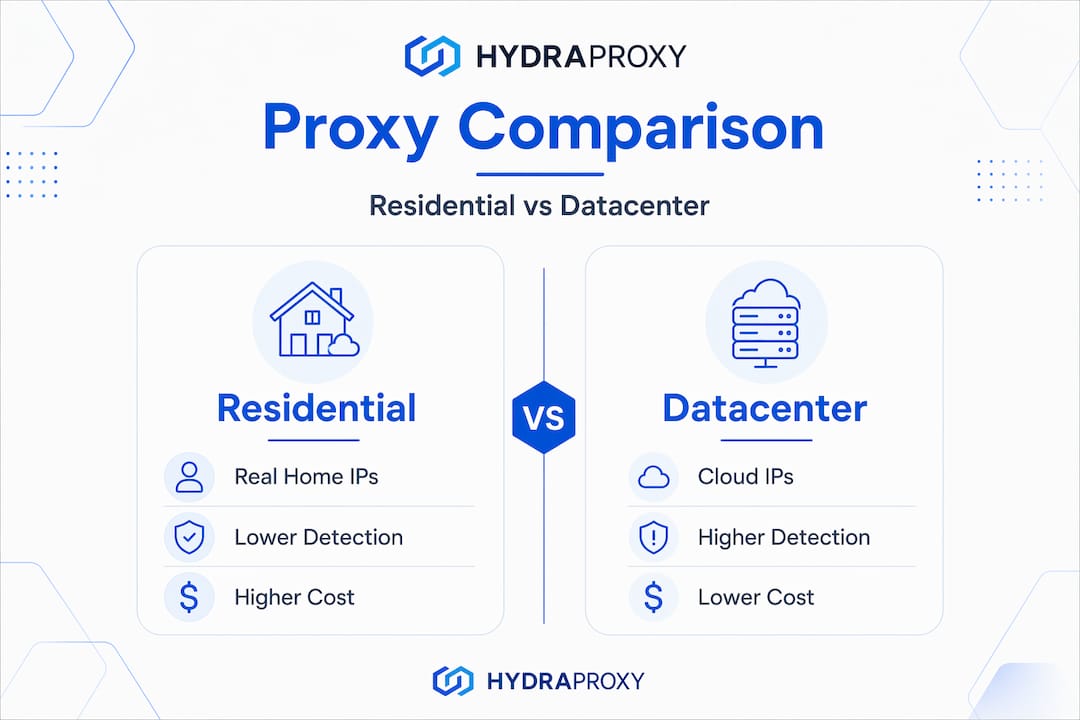
Choosing the right proxy type comes down to understanding where each one succeeds and where it fails. The comparison below covers the factors that matter most.
| Factor | Residential proxies | Datacenter proxies |
|---|---|---|
| IP source | Real home ISP addresses | Cloud server providers |
| Detection risk | Low | High |
| Speed | Moderate | Fast |
| Cost per GB | $0.84 to $8.40 | $0.10 to $1.00 |
| Best for | Scraping, ad verification, social media | Speed-critical, low-detection-risk tasks |
| Block resistance | High | Low to moderate |
Datacenter proxies are cheaper and faster, but their IP ranges are publicly mapped and can be blacklisted quickly by anti-bot systems. If you are scraping a site with basic defenses or running internal testing where detection is not a concern, datacenter proxies are a reasonable choice. You can read more about that option on Hydraproxy’s page covering datacenter proxy fundamentals.

Residential proxies are the better call when your target site runs sophisticated anti-bot systems or when your task requires appearing as a real geographic user. Social media platforms, e-commerce sites, and travel fare aggregators all fall into this category. They analyze behavioral signals, not just IP addresses. Switching to residential IPs removes the easiest way for those systems to flag your traffic.
The impact of rotation also plays into this comparison. A residential proxy that rotates IPs continuously distributes your request load across a large pool of real addresses, reducing per-IP exposure. That makes it far harder for a site to identify and block a pattern compared to sending all traffic through a single datacenter server.
Pro Tip: If you are testing a new scraping workflow, start with datacenter proxies to validate your logic, then switch to residential proxies once you are ready to run against production targets with real anti-bot defenses. This approach cuts early-stage costs without sacrificing end-state quality.
Real-world use cases for residential proxies
Residential proxies are widely used across industries because they replicate genuine user behavior in ways other proxy types cannot. The use cases below represent the most common and highest-value applications.
- Online privacy and anonymization. Residential IPs obscure your actual identity and location from websites, trackers, and surveillance systems. For individuals and enterprises handling sensitive research, this is a baseline requirement.
- Bypassing geo-restrictions. Residential proxies provide regionally consistent IP footprints that match real user locations. This allows access to location-locked content, pricing data, and regional services that would otherwise be unavailable.
- Web scraping and data collection. Large-scale data gathering from e-commerce platforms, job boards, and news sites depends on IP rotation to avoid rate limits and bans. Residential proxies give scrapers the legitimacy to operate at volume.
- Ad verification. Marketers use residential proxies to check how their ads appear in different regions, verify that placements are running correctly, and catch fraudulent activity that only shows up when viewed from specific locations.
- Types of residential proxies marketing teams use include both rotating and static residential IPs for managing ad campaigns, tracking competitor pricing, and verifying localized landing pages. The ability to view content as a real user in a specific city gives marketing teams a direct accuracy advantage.
- Residential proxies for social media management. Managing multiple accounts on platforms like Instagram, LinkedIn, or X requires each account to appear as a separate, real user. Residential proxies assign unique IPs per account, reducing the risk of platform-side bans triggered by shared IP patterns.
- Quality assurance and website testing. Development teams use residential proxies to test how a site performs for users in different countries, checking load times, localized content delivery, and region-specific features under realistic conditions.
Understanding residential proxy pricing
Residential proxy pricing follows a traffic-based model in most cases. You pay per gigabyte of data transferred rather than per IP address or per request. This pricing model affects budgeting significantly for high-volume users.
| Usage level | Typical cost per GB | Monthly estimate (100 GB) |
|---|---|---|
| Low volume (under 10 GB) | $6.00 to $8.40 | N/A |
| Mid volume (10 to 100 GB) | $2.00 to $5.00 | $200 to $500 |
| High volume (100+ GB) | $0.84 to $2.00 | $84 to $200 |
Residential proxies cost between $0.84 and $8.40 per GB depending on provider, plan size, and volume tier. Datacenter proxies run significantly cheaper, often below $1.00 per GB at any volume. The price gap reflects the real infrastructure behind residential IPs and the operational cost of maintaining large, ethically sourced pools.
Several factors push your costs up or down. Pool size matters: a provider with millions of IPs can rotate more freely, which reduces per-session pressure and often means fewer retries, which in turn cuts your bandwidth consumption. Sticky session duration also affects cost because longer held IPs consume more bandwidth per task. Providers that offer pay-as-you-go billing let you control spend without committing to monthly minimums.
Pro Tip: Calculate your actual bandwidth needs before purchasing. Most users overestimate how much data web scraping consumes. A typical scraped page is 100 to 500 KB. At $3.00 per GB, scraping 10,000 pages costs roughly $1.50 to $7.50. Run a small test batch first to get your real numbers.
Risks, detection, and how to stay effective
Residential proxies are not invisible. Modern defense systems have moved well beyond simple IP blacklists. JA4+ fingerprinting methods analyze connection behavior, TLS signatures, and traffic patterns to identify proxy traffic regardless of IP origin. This means a residential IP alone does not guarantee that your requests will pass undetected.
Common reasons residential proxies get blocked include:
- High request frequency from a single IP within a short window
- Mismatched browser fingerprints and geographic locations
- Using IPs from provider pools that have been previously flagged
- Ignoring rate limits or robots.txt directives on target sites
- Sourcing proxies from providers whose pools include exit nodes on compromised devices without user consent
That last point carries real ethical weight. Some proxy networks build their pools by installing software on user devices without transparent consent. This practice creates legal liability for the proxy buyer in certain jurisdictions and contributes to the very detection problems you are trying to avoid, since security researchers actively catalog these compromised IP pools.
Choosing a provider that clearly documents how its IP pool is sourced is not just an ethical decision. It is a practical one. Ethically sourced pools stay cleaner, get blocked less often, and hold their value longer over time.
Understanding why residential proxies get blocked gives you the knowledge to configure your setup defensibly. Pair residential IPs with realistic request pacing, proper session handling, and browser fingerprint consistency to get sustainable results.
My perspective on residential proxies in 2026
I have worked with proxy infrastructure long enough to see a clear pattern: most users either underestimate or overestimate what residential proxies can do. The underestimators think any proxy will work and get surprised when sophisticated sites block them within minutes. The overestimators think a residential IP is a permanent bypass and get frustrated when their accounts still get flagged.
My take is straightforward. Residential proxies remain valuable despite detection advances because connection fingerprinting requires significantly more sophisticated infrastructure to deploy consistently. Most sites are not running JA4+ analysis on every request. Residential IPs still clear the bar for the vast majority of real-world use cases, from geo-unblocking to large-scale scraping.
What I have learned about cost versus performance is this: cheaper, smaller pool providers cost you more in the long run through retries, failed requests, and troubleshooting time. Paying $3.00 per GB from a provider with a large, ethically sourced pool beats paying $1.50 from a provider whose IPs are half-burned. The math only looks favorable until you account for wasted bandwidth.
The ethical dimension is not optional. Proxy misuse tied to legally gray sourcing practices creates exposure at the business level, particularly for companies operating under financial sector compliance frameworks or in regulated industries. Use transparent providers, follow platform terms of service where they apply, and document your use case internally.
— Eduard
Why Hydraproxy is worth your consideration
If you have worked through this article and you know what a residential proxy is and what you need it for, the next step is finding a provider whose infrastructure matches your use case.
Hydraproxy operates a large residential proxy network built for high anonymity, session control, and geo-targeted access. The platform supports both rotating and sticky session configurations, with IP pools spanning multiple countries and regions. Pricing follows a pay-as-you-go model with no monthly commitments, which keeps costs tied to actual usage. Whether you need to access region-locked content, run ad verification at scale, or manage social media accounts across multiple geographies, Hydraproxy has the infrastructure to support it.
You can start with Hydraproxy’s overview of residential proxy fundamentals to confirm the setup matches your technical requirements. For a broader view of what the network supports, the proxy use case library covers SEO, research, ad verification, and more. Hydraproxy also offers a money-back guarantee and instant access after purchase, so you can validate performance before committing to larger volume.
FAQ
What is a residential proxy in simple terms?
A residential proxy routes your internet traffic through a real IP address assigned by an ISP to a home user, making your requests appear as legitimate residential traffic rather than server-based activity.
How do residential proxies differ from datacenter proxies?
Residential proxies use real home IPs and carry lower detection risk, while datacenter proxies are cheaper and faster but are more easily identified and blocked by anti-bot systems.
Are residential proxies legal to use?
Using residential proxies is legal in most jurisdictions for purposes like privacy, research, and geo-unblocking. The legality depends on how you use them and whether your provider sources its IP pool ethically with user consent.
How much do residential proxies cost?
Residential proxy pricing typically runs between $0.84 and $8.40 per GB, with high-volume plans bringing the per-GB rate down significantly compared to low-volume or pay-as-you-go tiers.
Can residential proxies be detected and blocked?
Yes. Modern detection systems use behavioral fingerprinting techniques beyond IP analysis, so pairing residential IPs with realistic request pacing and consistent browser fingerprints is necessary for sustained effectiveness.