What Is HTTP Proxy Protocol: A Technical Guide

Most tech professionals know what a proxy does in a general sense. Fewer can precisely explain what is HTTP proxy protocol, and even fewer can articulate the difference between that and the separately defined PROXY protocol that operates at Layer 4. This gap in understanding creates real problems in security design, backend configuration, and network architecture. This guide covers the technical definition, mechanics, security implications, and practical applications of HTTP proxy protocol so you can make informed decisions in your own infrastructure.
Table of Contents
- Key takeaways
- What is HTTP proxy protocol: definition and core functionality
- How the CONNECT method and TCP tunneling work
- HTTP proxy protocol vs. the PROXY protocol
- HTTP proxy benefits and security considerations
- Practical applications and configuration
- My perspective on proxy protocol precision in security design
- Apply proxy knowledge with Hydraproxy’s network
- FAQ
Key takeaways
| Point | Details |
|---|---|
| HTTP proxy protocol defined | An HTTP proxy forwards client requests to destination servers while masking the original client IP address. |
| CONNECT method enables HTTPS | Browsers use HTTP CONNECT to tunnel encrypted HTTPS traffic through a proxy without payload inspection. |
| HTTP proxy vs. PROXY protocol | These are distinct: HTTP proxy is application-layer forwarding; PROXY protocol is a Layer 4 TCP header for client metadata. |
| Misconfigurations create serious risk | Accepting PROXY protocol data from untrusted sources allows identity spoofing and breaks access controls. |
| Proxy type shapes security posture | Forward and reverse proxies expose different identities and enforce controls at different points in the network. |
What is HTTP proxy protocol: definition and core functionality
The definition of proxy protocol in the HTTP context starts at the application layer. An HTTP proxy server acts as an intermediary between a client and a destination server, forwarding requests and masking the client’s IP address. When you send an HTTP request through a proxy, the destination server sees the proxy’s IP, not yours.
There are two foundational types of proxy servers relevant here.
- Forward proxy: Sits in front of clients and makes requests on their behalf. This is what most people mean when they say “HTTP proxy.” The server sees the proxy, not the user. Common uses include content filtering, anonymization, and caching.
- Reverse proxy: Sits in front of servers and represents them to clients. It handles incoming requests, distributes load, or adds a security layer. The client sees the proxy, not the backend server.
Choosing between these isn’t just an architectural preference. It directly determines which identities get exposed in connections and where policy controls are enforced. A forward proxy controls what your users can access. A reverse proxy controls how the outside world reaches your services.
For standard HTTP traffic, the proxy intercepts the client’s GET or POST request, re-issues it to the target server, receives the response, and returns it to the client. The proxy may modify headers, log traffic, cache responses, or block certain requests depending on its configuration.
Things get more interesting with HTTPS. Because HTTPS traffic is encrypted, a standard proxy cannot read or modify the payload. To handle this, browsers use the HTTP CONNECT method. The client sends a "CONNECTrequest to the proxy specifying the target host and port (typically 443). If the proxy approves, it responds with200 Connection Established`, and from that point forward, the proxy blindly forwards the encrypted TCP stream between the client and the destination server.

Pro Tip: When configuring HTTP proxy settings for a browser or application, the CONNECT method is automatically used for HTTPS URLs. You don’t need to specify this manually, but knowing it’s happening helps you debug certificate errors and proxy authentication failures.
How the CONNECT method and TCP tunneling work
Understanding how HTTP proxy protocol works technically requires a closer look at the CONNECT method and what happens under the hood during a tunneling session.
- Client sends CONNECT request. The client sends
CONNECT target.host:443 HTTP/1.1to the proxy. This is a request for the proxy to open a TCP connection to the specified host and port. - Proxy establishes the TCP connection. The proxy opens a TCP connection to
target.hoston port 443. No HTTP application data has been sent yet. - Proxy responds with 200. If the connection succeeds, the proxy sends back
HTTP/1.1 200 Connection Established. The tunnel is now open. - Client begins TLS handshake. The client sends the TLS ClientHello directly to the target server through the tunnel. The proxy does not see or parse this data.
- Encrypted data flows. From this point, the proxy simply forwards raw bytes in both directions. The TLS session is between the client and the origin server, not the proxy.
This mechanism allows non-HTTP protocols to be transported through HTTP tunnels. SSH, WebSocket connections over HTTPS, and even some VPN protocols can travel through a properly configured CONNECT tunnel. This is intentional, but it also creates risk.
Many proxy servers restrict the CONNECT method to specific ports. Most commonly, CONNECT is limited to port 443 because allowing arbitrary port tunneling turns the proxy into a general-purpose TCP relay. A misconfigured open proxy that allows CONNECT on all ports can be exploited to reach internal services, send spam through relay, or bypass firewall rules entirely.
Pro Tip: If you manage an HTTP proxy, explicitly allowlist the ports accessible via CONNECT. Port 443 covers most HTTPS needs. Anything beyond that requires a deliberate policy decision, not an open default.
There is also an important constraint worth knowing: CONNECT is a hop-by-hop method, which means each proxy in a chain must independently support and implement it. If you are running a multi-hop proxy setup, test the full chain. A break anywhere in the middle silently causes connection failures that are difficult to diagnose.
For secure proxy deployments, security postures for CONNECT should include port restrictions and proxy-level authentication to prevent unauthorized tunnel creation. This is especially relevant in enterprise environments where proxy servers are shared across departments with different trust levels.
HTTP proxy protocol vs. the PROXY protocol
This is where most technical documentation fails you. “HTTP proxy protocol” and “the PROXY protocol” sound related, but they are architecturally separate concepts serving entirely different purposes.
| Feature | HTTP proxy protocol | PROXY protocol |
|---|---|---|
| Layer | Application (Layer 7) | Transport (Layer 4) |
| Purpose | Forward HTTP requests, mask client IP | Pass original client IP metadata to backend |
| How it works | HTTP methods (GET, POST, CONNECT) | Prepended TCP header before application data |
| Common users | Browsers, HTTP clients, CDNs | Load balancers, TCP proxies (HAProxy, NGINX) |
| Visibility | Proxied requests visible as HTTP | Invisible to HTTP layer unless explicitly parsed |
The PROXY protocol is a Layer 4 mechanism designed to solve a specific problem: when a TCP connection passes through a load balancer or proxy, the backend server loses visibility into the original client’s IP and port. The PROXY protocol solves this by prepending a header to the TCP stream before any application data, containing the original source IP, destination IP, and ports.
Where the HTTP proxy protocol operates by forwarding and transforming HTTP requests, the PROXY protocol is invisible at the HTTP level. It exists at the TCP layer and is consumed by the listening service (such as HAProxy or NGINX) before HTTP parsing even begins.
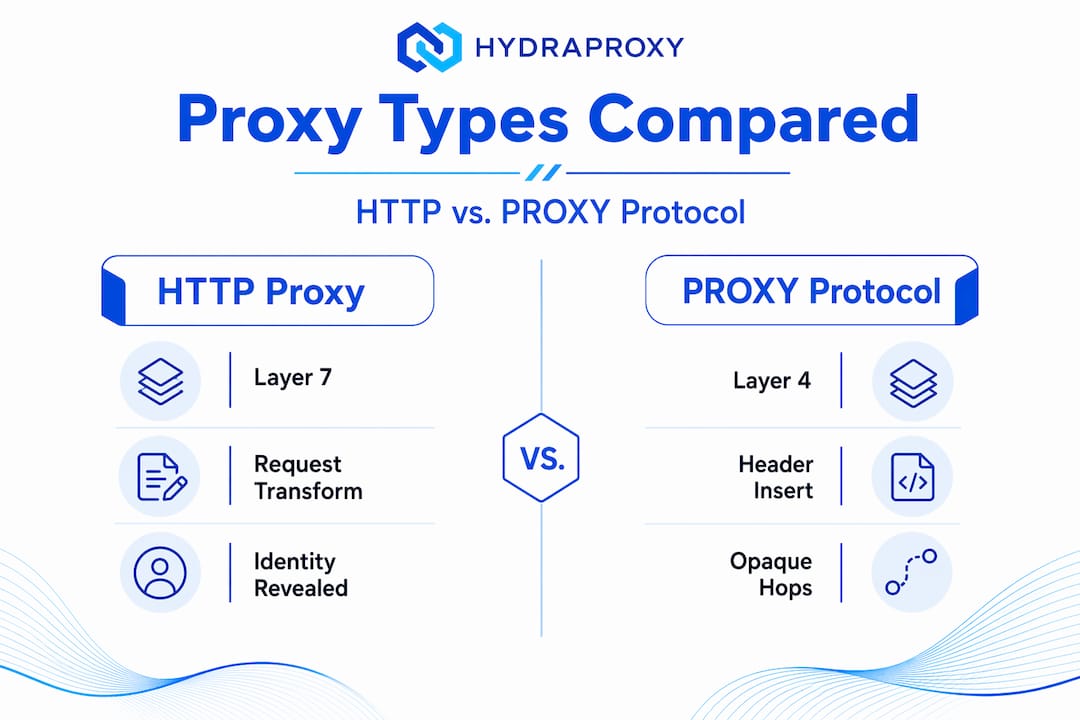
Here is where the critical security risk appears. Accepting PROXY protocol data from untrusted sources allows any client who can reach your backend to forge the client IP in the prepended header. If your backend trusts this header without validating that the connection came from a known proxy, you have a spoofing vector. Rate limiting, geo-blocking, and access controls built on client IP will all be bypassed.
The practical takeaway: only enable PROXY protocol parsing on interfaces that exclusively accept connections from trusted upstream proxies. Never expose a PROXY protocol-enabled port directly to the public internet. For a broader comparison of proxy types and protocols, SOCKS vs HTTP proxy differences are also worth understanding, since SOCKS operates differently from both HTTP proxy protocol and the PROXY protocol.
HTTP proxy benefits and security considerations
HTTP proxy protocol brings concrete advantages to network security and performance, but those advantages depend entirely on correct configuration.
Performance gains through caching are one of the most underutilized benefits. An HTTP proxy can cache responses for frequently requested resources. For organizations with many users accessing the same content, this reduces upstream bandwidth consumption and lowers latency. HTTP proxy servers acting as content filters can also block access to known malicious domains before a connection is even attempted, providing a layer of protection that operates independently of endpoint security software.
From an anonymity perspective, HTTP proxies mask the originating client IP address from destination servers. For web scraping, ad verification, and market research, this is operationally necessary.
Security risks worth knowing:
- Open proxy abuse: A proxy that does not enforce authentication or IP restrictions can be used by anyone. Open HTTP proxies are regularly scanned for and exploited as relay points.
- Header injection: Misconfigured proxies may add or preserve headers like
X-Forwarded-Forthat leak real client IPs to destination servers. If anonymity matters, verify what headers your proxy strips or adds. - TLS inspection risk: When enterprises deploy SSL/TLS intercepting proxies, the proxy terminates the client’s TLS session and re-establishes it to the origin. Encrypted traffic through CONNECT is not inspected by default, but when TLS inspection is enabled, certificate trust must be carefully managed to avoid introducing new attack surfaces.
- Backend misattribution: Mixing HTTP header-based and PROXY protocol-based client IP attribution in the same backend silently breaks rate limiting, logging, and access controls.
Pro Tip: When evaluating proxy security, check your proxy security infrastructure specifically for which client IP attribution method your backend relies on. Inconsistency between services in the same stack is a common source of security gaps.
Practical applications and configuration
HTTP proxy protocol is used across a wide range of scenarios that tech professionals and developers deal with regularly.
Common uses of HTTP proxy in production:
- Corporate network filtering and monitoring
- Web scraping and automated data collection at scale
- QA and browser testing that requires geographic IP variation
- API request routing and rate limit management
- Ad verification to confirm ads display correctly in target regions
Configuring HTTP proxy settings in practice:
- Environment variables: Most HTTP clients and tools respect
HTTP_PROXYandHTTPS_PROXYenvironment variables. Set these at the system or application level to route all traffic through a specific proxy. - Browser settings: Browsers allow manual proxy configuration under network settings, where you specify the proxy host, port, and optionally authentication credentials.
- curl configuration: Running
curl --proxy http://proxyhost:portroutes the request through the specified HTTP proxy. For a detailed walkthrough, the guide on using curl with a proxy covers authentication, HTTPS tunneling, and debugging options. - Application-level proxy settings: Most HTTP libraries (requests in Python, Axios in Node.js, HttpClient in Java) accept proxy configuration through constructor options or environment variable pass-through.
Troubleshooting common proxy issues:
- Certificate errors with HTTPS: Usually caused by a TLS-intercepting proxy presenting its own certificate. Add the proxy’s CA certificate to your trust store.
- 407 Proxy Authentication Required: The proxy requires credentials. Check your HTTP proxy settings for the username and password fields.
- Connection timeouts through CONNECT: Verify the target port is on the proxy’s allowlist. Also confirm intermediate proxies in a chain all support CONNECT.
- Unexpected IP leaks: Check for DNS leaks and confirm your application routes DNS queries through the proxy rather than the local resolver.
Understanding the difference between HTTP and HTTPS proxying is also relevant here, since many configuration issues arise from treating them identically when their proxy handling diverges.
My perspective on proxy protocol precision in security design
I’ve worked through enough proxy-related security incidents to say with confidence that the single most expensive mistake I see is treating “proxy protocol” as a generic term. In my experience, backend engineers configure services to accept PROXY protocol headers without restricting which source IPs can send them. The security team documents the system as “using a proxy for client IP attribution.” Both statements are true, and both are dangerously incomplete.
What I’ve learned is that precision in terminology directly translates to precision in access control. When a team says their system “supports the proxy protocol,” I ask: which one? At what layer? From what trusted sources? The answers usually reveal gaps.
The evolving role of encrypted traffic complicates this further. As more traffic moves to HTTPS and HTTP/3, the HTTP CONNECT tunnel becomes the primary inspection bypass mechanism. Proxies that don’t implement TLS inspection become operationally blind to payload content. That’s sometimes intentional and appropriate. But it needs to be a deliberate architectural choice, not a default that went unexamined.
My advice: document your proxy’s client IP attribution method explicitly, maintain a strict allowlist for PROXY protocol-enabled interfaces, and test your proxy chain end-to-end before deploying to production. The difference between a correctly attributed client IP and a spoofed one can be the difference between a working rate limiter and a completely bypassed one.
— Eduard
Apply proxy knowledge with Hydraproxy’s network
Understanding HTTP proxy protocol is the foundation, but the infrastructure you deploy it on determines real-world results. Hydraproxy provides premium residential proxy networks built for technical users who need high anonymity, precise session control, and reliable IP attribution. Whether you are running automated testing, ad verification, or large-scale data collection, Hydraproxy’s residential and mobile proxy pools give you the geographic targeting and authentication flexibility that production workloads require. The network supports both rotating and sticky sessions, multiple authentication methods, and unlimited bandwidth, with no DNS leaks and no monthly commitments. For developers and IT professionals who have just mapped out how HTTP proxy protocol works, the next step is deploying it on infrastructure that actually holds up under load. Explore Hydraproxy’s proxy services overview to match the right proxy type to your specific use case.
FAQ
What is HTTP proxy protocol in simple terms?
An HTTP proxy protocol is the set of rules governing how an HTTP proxy server forwards client requests to destination servers while masking the client’s original IP address. It operates at the application layer using standard HTTP methods.
How does HTTP proxy work with HTTPS traffic?
For HTTPS, the client sends an HTTP CONNECT request to the proxy, which establishes a TCP tunnel to the destination server. The proxy then forwards encrypted data without reading or modifying the payload.
What is the difference between HTTP proxy protocol and the PROXY protocol?
HTTP proxy protocol is an application-layer mechanism for forwarding HTTP requests. The PROXY protocol is a separate Layer 4 TCP header format that passes original client connection metadata (IP and port) from a load balancer or proxy to a backend server.
What are the main HTTP proxy benefits for security?
HTTP proxies provide IP masking, content filtering, traffic caching, and the ability to block malicious domains before connections are established. Properly configured, they add a meaningful layer between internal clients and the public internet.
What risks come from misconfiguring an HTTP proxy?
The most serious risks include open relay abuse via unrestricted CONNECT tunneling, client IP spoofing through untrusted PROXY protocol headers, TLS certificate trust failures, and backend attribution errors that break rate limiting and access controls.