What Is an IP Whitelisting Proxy and How It Works

IP whitelisting proxy is one of those security concepts that sounds simple until you try to implement it at scale. The core idea: only connections from pre-approved IP addresses can access your proxy server or protected resource. Everything else gets blocked at the gate. Many teams treat this as a complete security solution, but that assumption creates real exposure. Understanding what is IP whitelisting proxy, how it actually works at the network level, and where it falls short will help you build access control that holds up in practice, not just in theory.
Table of Contents
- Key Takeaways
- What is IP whitelisting proxy and how it works
- Security benefits of IP whitelisting proxies
- Limitations of IP whitelisting proxies
- Best practices for managing IP whitelisting proxies
- Real-world use cases for IP whitelisting proxies
- My take on IP whitelisting proxies in 2026
- Secure your proxy access with Hydraproxy
- FAQ
Key Takeaways
| Point | Details |
|---|---|
| IP whitelisting defined | A proxy restricts access by allowing only pre-approved IP addresses, blocking all others by default. |
| Foundational but limited | IP whitelisting reduces attack surface but cannot verify user or device identity on its own. |
| Dynamic environments are a challenge | Cloud infrastructure, remote work, and mobile users complicate static IP allowlists significantly. |
| Layered security is required | Combining IP whitelisting with identity-based authentication produces stronger access control than either alone. |
| Active management matters | Allowlists must be regularly updated, automated where possible, and reviewed to avoid stale entries. |
What is IP whitelisting proxy and how it works
A proxy server sits between your device and the wider internet, forwarding requests on your behalf. When you add IP whitelisting to that setup, you are telling the proxy: only accept connections from specific, approved IP addresses. Any request arriving from an IP not on that list gets dropped before it goes any further.
Understanding how does IP whitelisting work at the technical level requires looking at where filtering happens. Most well-configured systems enforce IP checks at the network layer before any authentication step runs. This means unrecognized traffic never even reaches your login page or API endpoint. That early interception reduces the load on your authentication systems and limits exposure.
Here is a practical step-by-step of how the process runs in a typical proxy setup:
- A client sends a connection request to the proxy server.
- The proxy’s access control layer reads the source IP of the incoming request.
- That IP is checked against the allowlist stored in the proxy configuration or middleware.
- If the IP matches an approved entry, the connection proceeds to authentication and routing.
- If the IP is not on the allowlist, the request is rejected with a 403 or connection refused response.
- Access logs record the attempt, including denied requests, for audit review.
This process runs before any business logic or user credentials are evaluated. As IP whitelisting acts as a coarse filter layer, it reduces the volume of unauthenticated requests reaching sensitive systems, which matters when you are dealing with automated scanners and bots probing your infrastructure constantly.
Pro Tip: When configuring a proxy allowlist, always add your monitoring and alerting system IPs alongside production client IPs. Otherwise, your own security tools may get blocked and leave you with gaps in visibility.
Security benefits of IP whitelisting proxies
The benefits of IP whitelisting are most visible in environments where traffic originates from a small, predictable set of locations. A corporate office connecting to a data scraping proxy, a QA team accessing a staging API, or an ad verification service pulling from a defined server cluster are all examples where IP allowlisting delivers clear value.
Here is what you gain from a properly configured IP whitelisting proxy:
- Reduced attack surface. IP whitelisting reduces attack surface and blocks unauthorized access before it reaches authentication layers. This limits the window for brute-force attempts, credential stuffing, and automated scans.
- Protection against automated threats. Bots, scrapers, and exploit kits typically originate from IP ranges not on your allowlist. Blocking at the IP level stops them immediately.
- Simplified auditing. When only approved IPs can connect, your access logs become cleaner. Anomalies are easier to spot because the baseline traffic is tightly defined.
- No extra hardware required. IP whitelisting is a configuration-level control. You implement it in your proxy software, firewall rules, or middleware without purchasing additional infrastructure.
- Cost-effective deployment. Because it operates at the network layer, IP allowlisting adds minimal processing overhead compared to running full authentication checks on every request.
IP whitelisting fits best as an outer guardrail in a layered security model. Think of it as the first checkpoint. It narrows down who can even attempt to connect, which makes every layer behind it more effective. According to IP allowlisting use cases research, organizations commonly use it to protect APIs, VPN endpoints, administrative interfaces, and proxy services from unauthorized external access.
One point worth highlighting: a default-deny posture, where all IPs are blocked unless explicitly approved, is fundamentally stronger than a blocklist approach. Blocklists fail against unknown IPs, while whitelisting requires explicit trust before any connection proceeds.

Limitations of IP whitelisting proxies
Knowing the IP whitelisting proxy explained version is not complete without understanding where it breaks down. The core problem is identity blindness. IP whitelisting tells you where a connection is coming from. It does not tell you who is behind that connection or what device is being used.
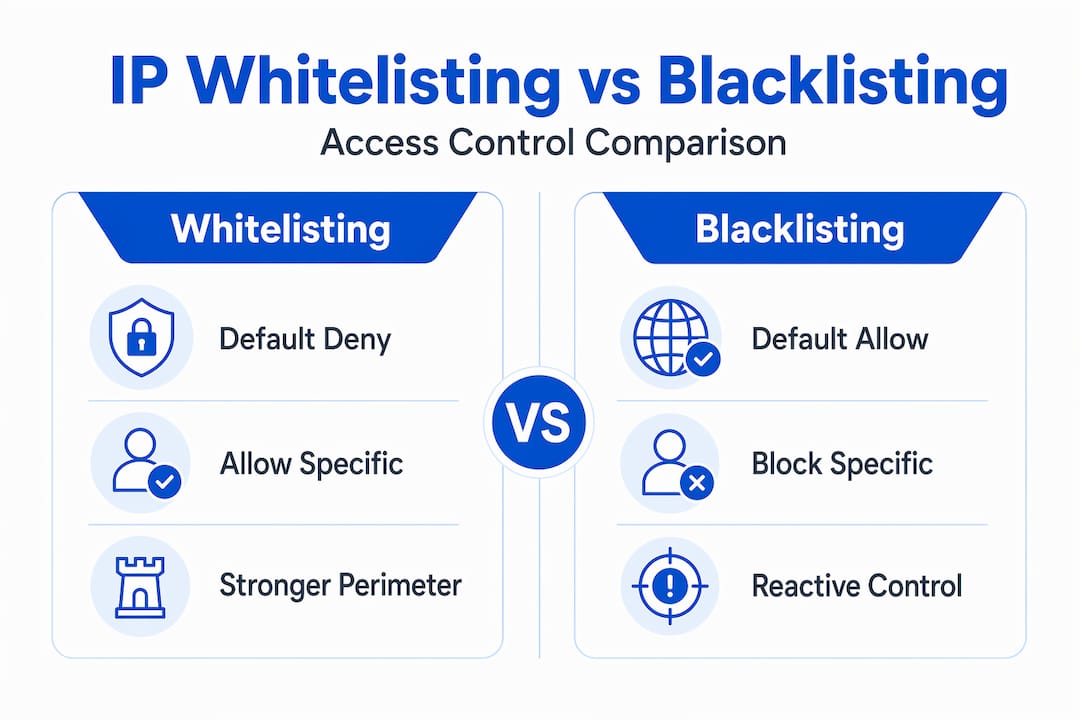
If an attacker compromises a machine on your approved IP range, or positions themselves behind a shared IP through a VPN or NAT gateway, your allowlist offers no protection. As IP whitelisting cannot verify user identity, it is blind to the actual actor behind a whitelisted address.
| Factor | IP whitelisting | Blacklisting |
|---|---|---|
| Default posture | Deny all, allow specific | Allow all, deny specific |
| Known threat response | Proactive, blocks by default | Reactive, blocks after identification |
| Unknown IP handling | Blocked automatically | Allowed until flagged |
| Identity verification | None | None |
| Maintenance burden | High in dynamic environments | Ongoing threat feed updates required |
| Best use case | Stable, controlled access points | Broad threat filtering at perimeter |
Dynamic IP addresses present a serious operational challenge. Remote workers, cloud-based build systems, and mobile devices frequently change IP addresses. Every time an infrastructure component scales up or changes its egress IP, you need to update your allowlist. Static IP allowlists break quickly in cloud environments without active management and automation.
There is also the shared IP problem. In office environments, dozens or hundreds of users may share a single NAT IP. Whitelisting that IP grants all of them access, which introduces implicit trust for every device behind it. A contractor’s unpatched laptop behind a trusted office IP gets the same access as a hardened company device.
Pro Tip: Never treat a whitelisted IP as automatically trustworthy for privileged operations. Always require a second verification factor for admin-level actions, even from approved IP ranges.
Best practices for managing IP whitelisting proxies
The difference between whitelisting and blacklisting in terms of security posture is significant, but neither approach works well without active management. These practices keep your IP allowlists functional and secure as your environment evolves.
- Treat allowlists as living documents. Review and update them on a defined schedule, at minimum monthly, and trigger reviews after any infrastructure change.
- Combine IP whitelisting with authentication. IP whitelisting with user authentication produces stronger security than either control alone. IP narrows the source; authentication verifies the actor.
- Enforce checks at the middleware level. Middleware-level IP trust checks block untrusted requests before they reach application logic, improving both security and system efficiency.
- Route remote access through fixed egress gateways. Fixed IP gateway routing through VPNs or dedicated egress IPs keeps your allowlist manageable even when the underlying devices are mobile.
- Use TTLs for temporary access grants. Time-limited entries in your allowlist, expiring automatically through tools like Redis-based IP caches, prevent stale trusted IPs from accumulating.
- Avoid IP-level rate limiting behind NAT. IP-based rate limiting behind NAT risks locking out entire offices sharing a single IP. Apply rate limits at the user session or API key level instead.
| Practice | Implementation method | Risk addressed |
|---|---|---|
| Regular allowlist review | Scheduled audit process | Stale entries from departed users or changed IPs |
| TTL-based expiration | Redis or in-memory cache with TTL | Accumulation of outdated trusted IPs |
| Fixed egress VPN | Dedicated VPN or static egress IP gateway | Dynamic IP churn from remote or mobile workers |
| Middleware enforcement | Gateway or API layer IP check before routing | Unauthorized traffic reaching application logic |
| Multi-factor for privileged access | Auth layer on top of IP control | Compromised devices behind trusted IPs |
Real-world use cases for IP whitelisting proxies
Understanding IP whitelisting security measures in practice helps clarify when this approach is worth the operational overhead.
-
Ad verification and brand monitoring. Agencies running ad verification tools whitelist their proxy service’s IP ranges so that only their approved infrastructure can make authenticated requests to publisher endpoints. This prevents unauthorized entities from querying the same routes.
-
API access for data collection. A market research firm whitelists the static IPs of its scraping servers with data provider APIs. The provider knows requests from those IPs are legitimate, and the firm avoids re-authentication on every request.
-
Administrative interface protection. System administrators restrict SSH, database management, and control panel access to IPs from the corporate VPN. No outside IP can even reach the login prompt, let alone attempt a password.
-
Multi-layered access control. A financial technology team combines IP whitelisting at the load balancer level with OAuth token verification at the API layer. An attacker would need both a trusted source IP and a valid token, dramatically increasing the difficulty of unauthorized access.
-
Cautionary example: scaling breaks static lists. A startup whitelists their three production server IPs for proxy access. They migrate to auto-scaling cloud infrastructure. New server instances generate new IPs. Requests begin failing in production. The team discovers their static allowlist has no mechanism to update dynamically. This scenario is common and entirely preventable with automated allowlist management tied to your infrastructure provisioning process.
These examples show that IP whitelisting proxies work best when the network topology is predictable or deliberately constrained, such as routing through a fixed VPN egress point.
My take on IP whitelisting proxies in 2026
I’ve worked with IP whitelisting in proxy configurations long enough to know that most teams implement it correctly at first and then let it degrade. The initial setup is straightforward. The ongoing management is where things quietly go wrong.
What I’ve found is that static allowlists are genuinely useful when you treat them as one layer in a stack, not the whole stack. I’ve seen teams disable two-factor authentication for a service because they figured IP whitelisting was sufficient. That’s a mistake. The moment someone’s device on a trusted IP range gets compromised, there is no secondary check to catch it.
The middleware enforcement pattern is underused and worth adopting. Blocking unknown IPs before they reach your application logic reduces noise in your logs and takes processing load off your authentication systems. The key is handling rejected IPs gracefully. Returning a clear 403 with a support contact, rather than a silent timeout, prevents legitimate users from spending hours debugging a connection problem.
Mobile and cloud complexity is where I see the most real-world pain. Teams that review proxy configurations for modern environments often find their allowlists have grown into unreviewed lists of IP ranges nobody fully understands anymore. Automation and TTLs are not optional in 2026. They are table stakes.
— Eduard
Secure your proxy access with Hydraproxy
If you are looking to put IP whitelisting into practice with a reliable proxy network behind it, Hydraproxy provides the infrastructure that makes this manageable.
Hydraproxy’s residential proxy network includes static IP options that are well-suited for allowlist configurations. Fixed residential and ISP proxies give you predictable egress IPs you can add to your allowlists without worrying about constant churn. The platform supports multiple authentication methods, session control, and a broad IP pool across global locations. For teams running ad verification, data collection, or API-driven workflows, Hydraproxy offers the stability and control that makes IP whitelisting a practical security layer rather than an ongoing maintenance headache. Explore Hydraproxy’s residential proxy sourcing to understand how IP stability is built into the infrastructure from the ground up.
FAQ
What is an IP whitelisting proxy?
An IP whitelisting proxy is a proxy server configured to accept connections only from pre-approved IP addresses, blocking all others by default. It acts as an access control layer before authentication, filtering traffic at the network level.
How does IP whitelisting work with a proxy server?
The proxy checks each incoming connection’s source IP against a stored allowlist. Matching IPs proceed to the next step; non-matching IPs are rejected immediately, typically with a 403 response, before reaching any application logic.
What is the difference between whitelisting and blacklisting?
Whitelisting uses a default-deny posture, blocking everything unless explicitly approved. Blacklisting allows all traffic and blocks only known threats. Whitelisting is more proactive and provides stronger baseline security but requires more active allowlist management.
What are the main limitations of IP whitelisting?
IP whitelisting cannot verify user or device identity. It also struggles in dynamic cloud or mobile environments where IP addresses change frequently. Devices behind a trusted shared IP receive access regardless of their security state.
Can IP whitelisting alone secure a proxy service?
No. IP whitelisting reduces the attack surface and blocks unauthorized sources, but it should always be combined with identity-based authentication. Using both controls together closes the gaps that either method leaves open on its own.