Why Developers Use Residential Proxies in 2026

Residential proxies are IP addresses assigned by real ISPs to household devices that developers use to simulate genuine user traffic, enabling accurate geo-targeting, anti-bot testing, and localized data collection. The core reason why developers use residential proxies comes down to authenticity: these IPs are indistinguishable from real consumer traffic, which datacenter IPs cannot replicate. According to HackerNoon’s developer guide, security and QA teams rely on residential proxies to emulate real user conditions, test anti-bot logic, and verify geolocation features under production-like constraints. Whether you are building a scraper, running ad verification, or stress-testing a geo-restricted API, residential proxies give you the ground-level IP presence that makes results trustworthy.
Why developers use residential proxies instead of datacenter proxies
The technical difference between residential and datacenter proxies is not just about IP origin. It determines whether your requests get through at all.
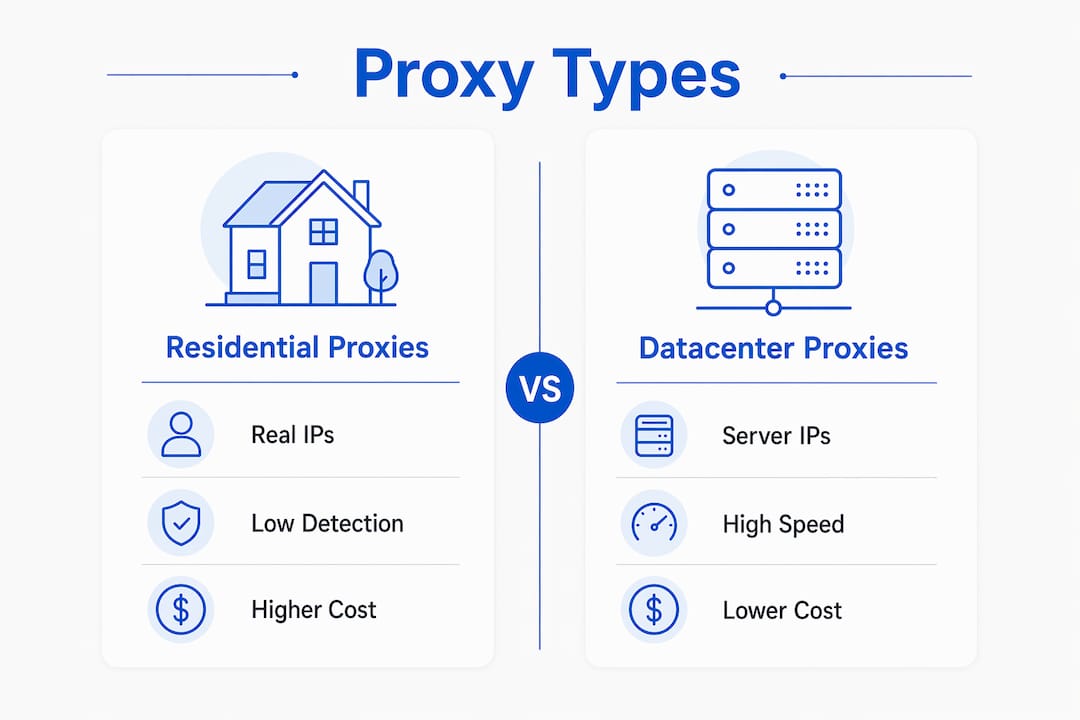
Residential proxies route traffic through real consumer ISP ranges, meaning every request carries the ASN signature of a home broadband provider. Datacenter proxies use server-hosted IPs from cloud providers like AWS or DigitalOcean, which are trivial to identify and block in bulk. As SentinelOne documents, residential proxies let traffic blend with legitimate user activity, while datacenter IPs are flagged by IP reputation systems almost immediately.
The practical implication is significant. A scraper running through datacenter IPs on a major e-commerce platform will hit a CAPTCHA wall within minutes. The same scraper routing through residential IPs can operate for hours because the traffic pattern looks like normal browsing. The trade-off, as Firecrawl explains, is that residential proxies cost more and run slower due to consumer-grade network routing.

| Aspect | Residential proxies | Datacenter proxies |
|---|---|---|
| IP source | Real ISP-assigned home IPs | Cloud server IPs |
| Speed | Slower, variable latency | Fast, consistent |
| Cost | Higher per GB | Lower per GB |
| Detection risk | Low | High |
| Anonymity | High | Moderate |
| Blocking rate | Low | High |
Session type is another critical variable. Rotating sessions assign a new IP on each request, which works well for independent scraping tasks. Sticky sessions hold the same IP across multiple requests, which is required for workflows involving login states, shopping carts, or multi-step form submissions. Choosing the wrong session type produces failures that look like application bugs rather than proxy configuration errors, a distinction that costs developers hours of debugging time.
Pro Tip: When testing checkout flows or authenticated user journeys, always use sticky sessions. Rotating sessions mid-workflow will break session tokens and produce misleading test results.
What are the most common use cases for residential proxies?
Residential proxies serve a specific category of developer tasks where IP authenticity directly affects output quality. These are the applications where real user-like traffic is not optional.
- Web scraping and data collection. Scraping price data, product listings, or search engine results requires IPs that bypass anti-bot systems. Residential proxies reduce blocking rates because they originate from consumer ISP ranges that anti-bot platforms cannot blacklist without also blocking real users.
- Geo-specific content testing. Developers building localization features need to verify that users in Germany, Japan, or Brazil see the correct language, currency, and content. Residential proxies with city-level targeting make this testable without physical hardware in each region.
- Ad verification. Ad fraud detection requires checking that ads display correctly across different geos and devices. Residential proxies let QA teams view ad placements as real users would, catching discrepancies that datacenter IPs would never expose.
- Anti-bot and anti-fraud system testing. Security engineers use residential proxies to probe their own defenses. Sending traffic through residential IPs simulates what a real attacker would use, producing more accurate test results than datacenter-based load testing.
- Competitive intelligence. Monitoring competitor pricing, inventory, or feature changes at scale requires sustained access to public web data. Residential proxies support this without triggering rate limits or IP bans.
- Travel fare and market research aggregation. Fare aggregators and market research tools depend on geo-accurate pricing data. A residential IP in Chicago will see different airline prices than one in London, and that difference is the data point.
Ethical use is a real constraint here. Residential proxies should only be used against systems you own, have permission to test, or are accessing within the terms of service of the target platform. The app testing and QA context is one of the clearest legitimate applications, where developers test their own infrastructure under realistic traffic conditions.
What performance and cost trade-offs should developers expect?
Residential proxies require engineering adjustments that datacenter proxies do not. Treating them as drop-in replacements for datacenter IPs produces unreliable results.
The latency profile of residential proxies is variable by design. Consumer broadband connections have inconsistent speeds depending on time of day, ISP throttling, and geographic distance. HackerNoon’s research confirms that this variability demands adjusted timeouts and retry logic in any application relying on residential proxy traffic. A timeout set for a datacenter proxy at 3 seconds will fail frequently through residential routing.
Here is a practical engineering checklist for residential proxy integration:
- Set extended timeouts. Start at 15 to 30 seconds for residential connections and tune down based on observed latency percentiles in your environment.
- Implement exponential backoff. Retry failed requests with increasing delays rather than immediate retries, which reduces the chance of hitting rate limits on the target server.
- Add rate limiting on your end. Even if the proxy provider allows high concurrency, sending too many requests too fast from the same geo-cluster will trigger behavioral detection on the target site.
- Monitor proxy health metrics. Track success rate, average response time, and error codes per proxy endpoint. Dead or degraded IPs should be rotated out automatically.
- Use hybrid proxy strategies. Route high-volume, low-sensitivity tasks through datacenter proxies and reserve residential IPs for tasks requiring authenticity. This reduces cost without sacrificing accuracy where it matters.
Pro Tip: Log every proxy request with its assigned IP, response time, and status code. This data lets you identify underperforming IPs before they affect production workflows and gives you audit trails for compliance.
How should developers integrate and manage residential proxies?
Effective proxy integration is an architecture decision, not a configuration detail. The way you structure proxy usage determines whether your system is maintainable and resilient.
- Build a proxy abstraction layer. Rather than hardcoding proxy credentials into individual scripts or services, centralize proxy configuration in a single module or service. This makes it straightforward to swap providers, rotate credentials, or change session types without touching application logic.
- Use credential-based authentication. Most enterprise-grade residential proxy providers support username and password authentication over HTTP or SOCKS5. IP whitelisting is simpler but less portable, especially in cloud environments where your egress IP changes.
- Match session type to workflow. As noted in HackerNoon’s session guidance, rotating sessions suit independent, stateless requests while sticky sessions are required for multi-step authenticated workflows. Mismatching these causes silent failures.
- Log all proxy activity. Maintain logs that include the proxy endpoint used, target URL, response code, and timestamp. This supports both debugging and compliance audits, particularly if your use case involves regulated data.
- Select providers with verified IP sourcing. Residential proxies sourced from botnets or compromised devices create legal and reputational risk. Choose providers that document their IP acquisition practices and operate within clear terms of service.
The benefits of residential proxies are only realized when the integration is built to handle their specific characteristics. A well-architected proxy layer treats residential IPs as a first-class infrastructure component, not an afterthought.
What security considerations surround residential proxy usage?
Residential proxies occupy a gray zone in security operations. Their legitimate uses are well-documented, but their abuse potential is equally real.
Spur.us research shows that residential proxies are difficult to block via IP reputation or ASN lookup because they blend with genuine consumer traffic. This is precisely what makes them useful for developers and precisely what makes them attractive for abuse. Security teams cannot simply blacklist residential IP ranges without also blocking real users, which forces a shift toward behavioral analysis.
“Security teams focus more on request behavior than IP alone for blocking when residential proxies mask source addresses.” — Spur.us
The Europol IOCTA 2026 report highlights that residential proxies contribute to expanded cybercrime capabilities by enabling attackers to evade anti-fraud systems through IP masking and encryption. This dual-use reality means developers must design proxy usage with explicit policy controls. Apply least-privilege principles: only the services that require residential proxy access should have it. Encrypt credentials in transit and at rest. Document the purpose of every proxy integration so that security audits can distinguish legitimate use from anomalous behavior.
Why security teams use residential proxies for their own testing is straightforward. Simulating attacker behavior requires using the same tools attackers use. Testing your own defenses with datacenter IPs produces results that do not reflect real threat conditions.
Key takeaways
Residential proxies are the correct tool when IP authenticity, geo-accuracy, and low detection risk are non-negotiable requirements in a developer’s workflow.
| Point | Details |
|---|---|
| Authenticity over speed | Residential IPs pass anti-bot checks that datacenter IPs fail, making them necessary for realistic testing. |
| Session type matters | Use rotating sessions for stateless scraping and sticky sessions for authenticated, multi-step workflows. |
| Engineering adjustments required | Extended timeouts, retry logic, and rate limiting are mandatory for reliable residential proxy performance. |
| Security is dual-use | Residential proxies help developers test defenses and help attackers evade them. Design with policy controls. |
| Hybrid strategies reduce cost | Combine residential and datacenter proxies to balance authenticity and cost across different task types. |
What I’ve learned from building with residential proxies
The biggest mistake I see developers make is treating residential proxies as a stealth tool rather than an engineering component. The moment you frame them as “how to avoid getting blocked,” you start making shortcuts that create fragile systems. The better frame is: residential proxies are a way to make your test environment match production reality.
That shift in thinking changes how you build. You invest in observability. You log proxy performance. You design session management deliberately. You stop being surprised when a sticky session breaks on a provider rotation and start building retry logic that handles it gracefully.
The session choice question is where I see the most silent failures. A developer sets up rotating sessions for a checkout flow test, gets inconsistent results, and spends two days assuming the application has a race condition. It does not. The session is dropping mid-flow. Choosing between rotating and sticky sessions is not a minor configuration detail. It is a core architectural decision.
On provider selection: the quality of the IP pool matters more than the price per GB. A cheap pool with a high percentage of flagged or shared IPs will produce worse results than a smaller, cleaner pool at higher cost. Verify that your provider documents how IPs are sourced. Providers that cannot answer that question clearly are a compliance risk.
The ethical dimension is not optional. Residential proxies used against systems without permission, or in ways that violate terms of service, create legal exposure. Build with that constraint in mind from day one, not as a retrofit.
— Eduard
Start testing with Hydraproxy’s residential IP network
Hydraproxy provides access to a large pool of verified residential IPs covering multiple countries and cities, with support for both rotating and sticky sessions. The infrastructure is built for developer workflows: credential-based authentication, flexible session control, and no monthly commitments so you can scale usage to match your project needs. Whether you are running geo-targeted scraping, verifying ad placements, or testing anti-bot defenses under realistic conditions, Hydraproxy’s residential proxy network gives you the IP authenticity your workflows require. Explore the full range of residential proxy applications or get started directly at hydraproxy.com.
FAQ
What are residential proxies used for by developers?
Developers use residential proxies for web scraping, geo-specific content testing, ad verification, anti-bot system testing, and competitive intelligence. These tasks require IPs that appear as real consumer traffic, which datacenter IPs cannot provide.
How do residential proxies differ from datacenter proxies?
Residential proxies use real ISP-assigned home IPs with low detection risk, while datacenter proxies use server IPs that anti-bot systems identify and block easily. Residential proxies cost more and run slower but are far harder to detect.
When should I use sticky sessions vs. rotating sessions?
Use sticky sessions for authenticated workflows, login flows, and multi-step processes that require a consistent IP. Use rotating sessions for independent, stateless requests like bulk data collection where session continuity is not needed.
Are residential proxies legal to use?
Residential proxies are legal when used against systems you own, have permission to access, or are accessing within the platform’s terms of service. Using them to bypass security controls on systems without authorization creates legal exposure.
Why do security teams use residential proxies for testing?
Security teams use residential proxies to simulate real attacker behavior, since attackers use residential IPs to evade detection. Testing defenses with datacenter IPs produces results that do not reflect actual threat conditions.